

The introduction of CMS can be said to be an essential subject in the management of corporate websites.
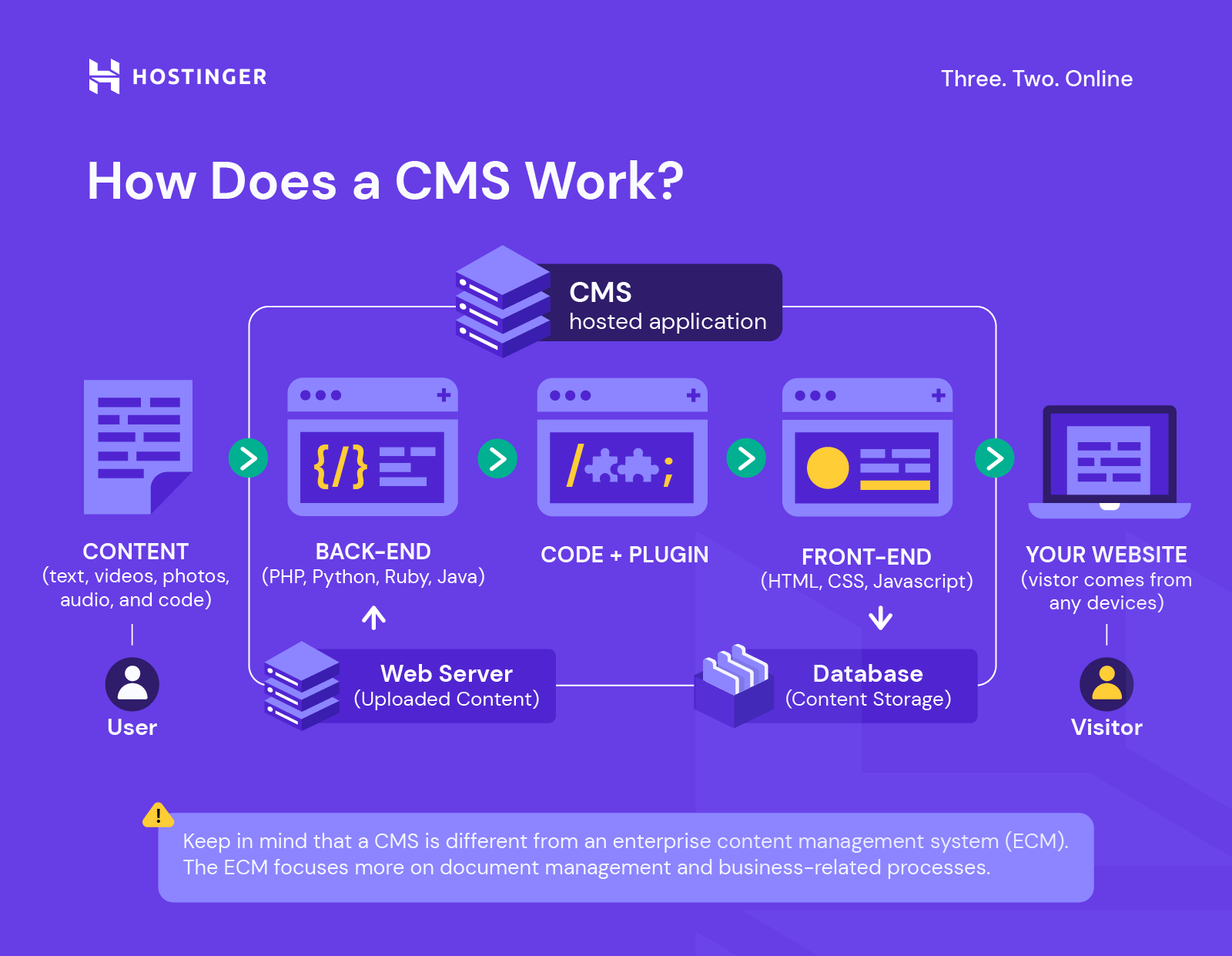
CMS is an abbreviation for Content Management Systems, which is a system for managing content.
This allows the person in charge to create and update a website without relying on experts or production companies.
However, it is true that implementing a full-scale CMS has high hurdles in terms of cost, technology, and construction preparation.
Under such circumstances, there is a system called Word Press that is attracting attention. The cost to install the system is free (there will be a charge for some additional functions and development), and it is easy to install and can be operated even by beginners. However, if you just use Word Press, it cannot be said that all the issues will be cleared.
So, in this article, what kind of word press is attracting attention? By introducing its features and using actual usage situations, we will explain it so that it will serve as a reliable guide to introducing WordPress.
What is Word Press?
Word Press is an “open source” system that is provided free of charge among CMS systems for managing websites.
We will look at what we can do by using this system from a functional perspective.
What you can do with Word Press
○Feature 1: You can freely create content
Word Press allows you to create and edit website content according to certain rules.
Of course, you can also make the content easier to read, change the font size and layout, and insert tables and images.
Traditionally, creating a website required design skills and knowledge of the HTML language, and was displayed as a static page created by a specialist, but even non-specialists can utilize standard formats (templates). By registering text information, it is dynamically displayed as a designed web page.

○Function 2 You can post articles This is the same as creating a page mentioned in Function 1, but you can register articles through the management screen. It can be used for posting company news and posting blogs.
○Function 3: Accepting posts In addition to unilateral information registration from the administrator, it is also possible to accept posts from users. This allows you to collect user information and operate a posting-based website.
○Function 4 Create a community You can operate a membership site or community site using the membership function. From a simple bulletin board function, it is also possible to expand the functionality and build an SNS site.
○Function 5: Operation of an EC site An EC site where products can be registered, paid for, and sold can be built relatively easily by expanding and making full use of the functions of Word Press. The same member registration and product registration mechanisms, shopping cart functions, and payment functions as in Function 4 will be expanded.
Features of Word Press
We’ve seen what Word Press can do.
Now, let’s take a look at the features of Word Press, introducing specific examples and usage scenarios, so that you can implement it in the best way possible.
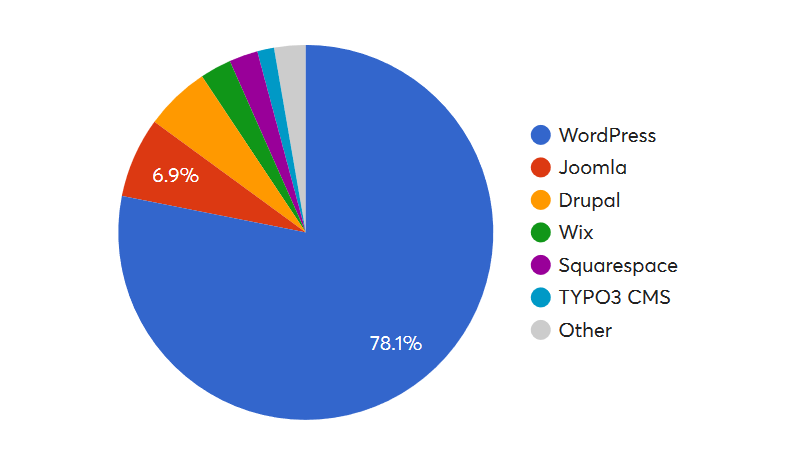
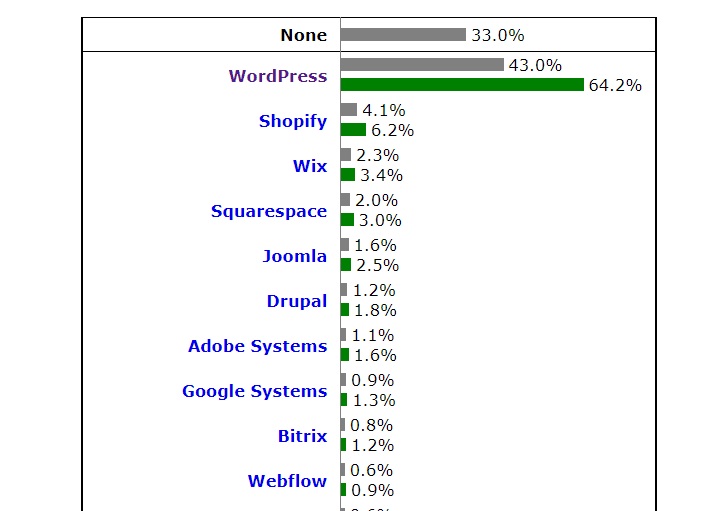
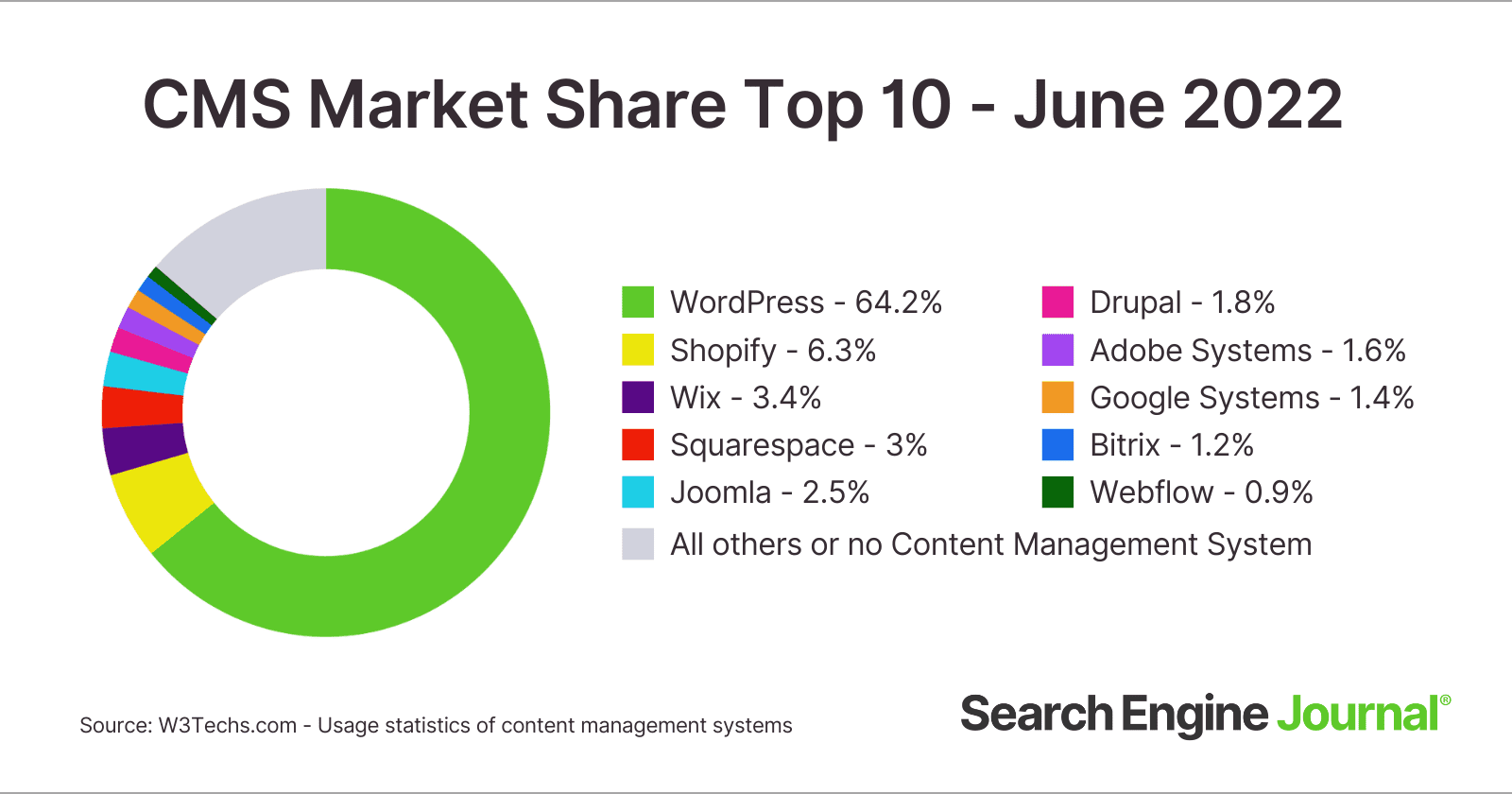
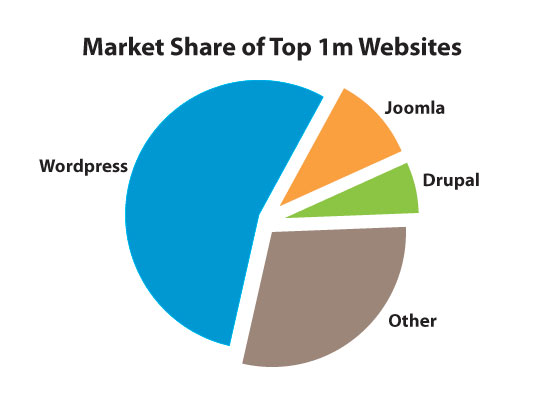
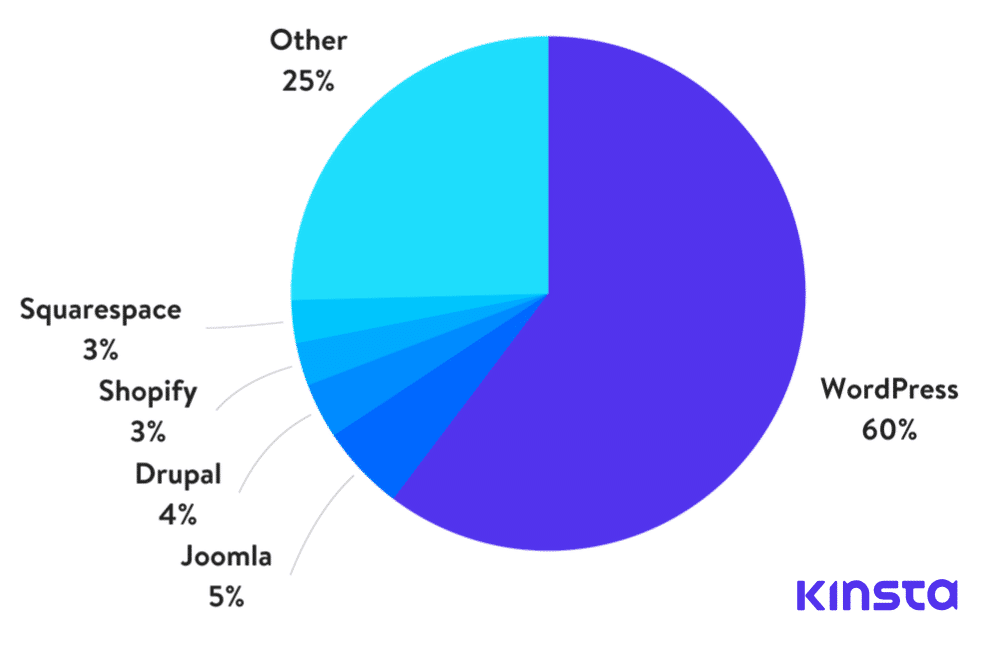
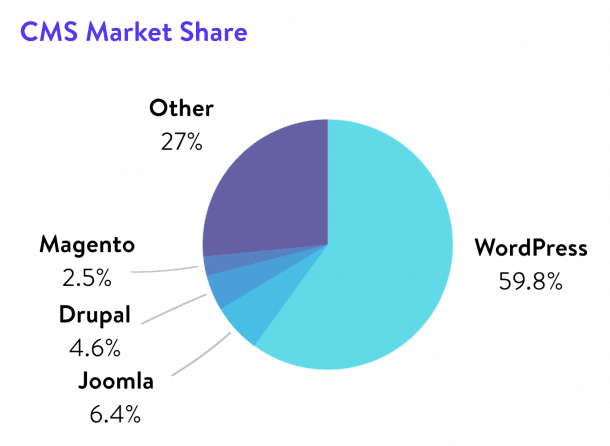
No.1 share in the world
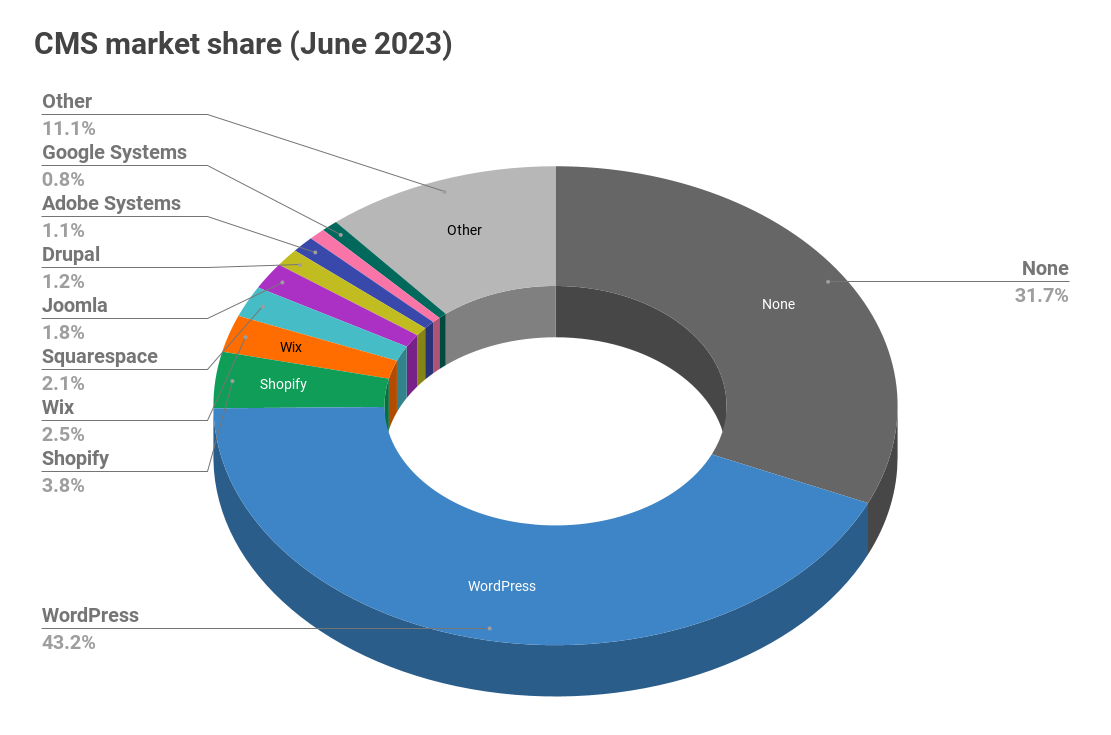
According to W3Techs, a web technology survey, Word Press accounts for 64.8% of websites with CMS and 41.2% of all websites, including those created statically. has been done. (As of 2021/2/10)
https://w3techs.com/technologies/details/cm-wordpress
This has continued to increase year by year from 13.1% in the 2011 survey, and this trend is expected to continue.
Word Press has an overwhelming market share in the world.
○Comparison with Movable Type Previously, Movable Type was a CMS that was often introduced in Japan.
Movable Type is different from Word Press and is a paid package type CMS, but it used to be so popular in Japan that people would say Movable Type when talking about CMS, but Word Press was born in 2003, and in 2004. After gaining market share as a blog feature, it continued to expand its functionality and established its current status as a complete CMS around 2008.
Possible reasons for this are the “open source type” mentioned below, and Movable Type, which uses Perl as the development language, is easy to learn, and WordPress uses PHP, which has also been increasing in share since 2000. This is due to the fact that it is adopted by
A large number of shares is directly linked to a wealth of knowledge and auxiliary tools, which is very effective for continued operation after introduction.
open source type
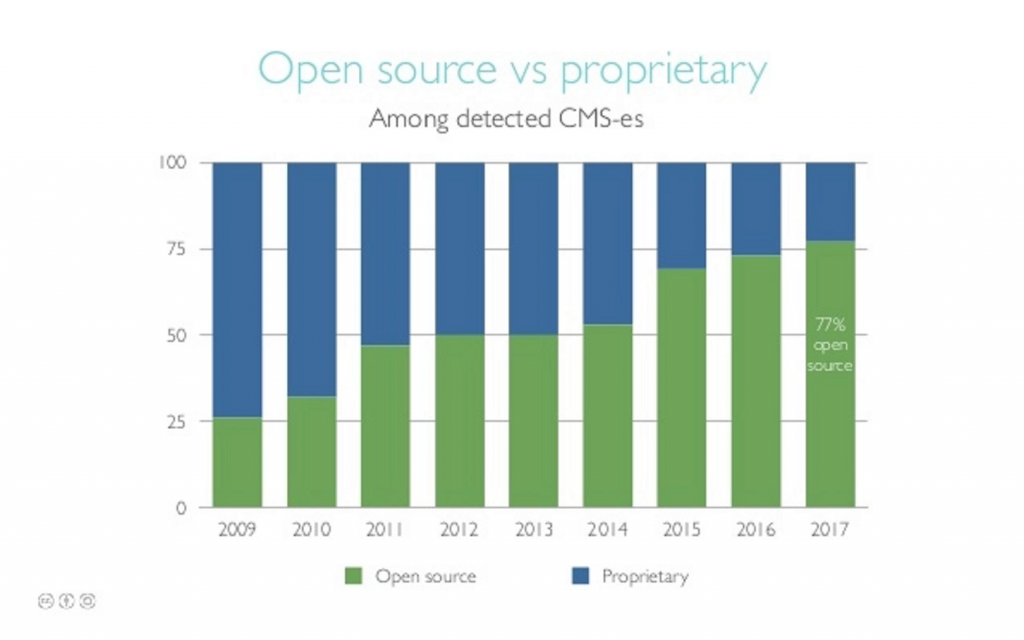
As mentioned earlier, the reason Word Press has greatly increased its market share is that it is an “open source” platform. “Open source” refers to programs that are distributed free of charge.
It is characterized by the fact that it can significantly reduce the initial time and labor required for construction, as well as the cost up to introduction.
Additionally, since the source is disclosed, you can freely customize it and build a website that suits your purposes.
○Other formats In contrast to open source type CMS, there are “package type” developed by manufacturers and vendors and provided for a fee, “full scratch” developed completely custom-made, and “ASP” that shares existing services. There are different types, and it is important to understand, compare, and consider the characteristics of each.
Low hurdles to introduction
Word Press is characterized by being able to reduce installation costs, time and effort from design to construction because it can be implemented as is from an already completed system.
In an extreme example, it is possible to install it on a server and start using it in just a few hours.
Highly operable
One of the reasons Word Press is so popular is that it is highly user-friendly.
The UI (User Interface) of the management screen (dashboard) is designed to be easy to understand, and even beginners can operate it without any hesitation.
○Operation example 1: Registering an article
Word Press makes it very easy to add pages and register articles. It is possible to register with a rich text tool that allows you to register layout information such as a blog entry by simple text input, or inserting tables and images.
[Text entry type UI]
A type where you enter simple text.

[Block-type UI]
A type that constructs the layout by inserting headings, body text, and images for each paragraph.
[Rich text type UI]
By operating buttons, you can visually specify text color and size, insert images, specify links, layout, etc.
○Operation example 2 SEO measures SEO measures have become indispensable in modern website management.
Word Press allows you to easily implement SEO measures when registering content and posting articles.
[meta tag settings]
Title settings and description settings for each page, which are the basics of SEO, can be specified for each registered page.
○Operation example 3 Menu installation It has become mainstream to install menus such as global
navigation
and footer navigation that allow the site structure to be understood at a glance.
Not only can you easily set up a submenu that hangs from the main menu, but if you modify one place, you can modify all pages at once.
It also has excellent operability and can be moved and installed intuitively using drag and drop.
[UI for menu installation]
○Operation example 4 Image registration Uploading images, which previously required a direct connection to the server, can now be registered in the “media storage area” from the UI. Additionally, simple resizing and editing of images that required specialized software can be done on the UI.
Insertion into a page can be performed by selecting from registered media and specifying the size and layout.
[Media library UI]
[Image editing UI]
○Operation example 5 Linking with SNS
It is important to be shared on SNS (referral links) in order to encourage external links that will increase your SEO rating.
You can easily add social media buttons to each page you register.
[Social media button selection UI]
○Operation example 6 Customization
Word Press is characterized by the use of a ready-made and complete CMS, but since it is open source, it can be freely customized.
Advanced design changes and program modifications can also be made from the UI.
[Customized UI]
There are many themes (designs)
Word Press has a “theme” that allows you to change the design template (including extensions) while keeping the basic program as is.
By retrofitting a “theme” with a design you like (or with features you want to add) to the basic WordPress, you can build an original website.
With Word Press, which has the No. 1 share in the world, users and customization companies around the world continue to develop themes that meet the needs of the world day and night, and they can choose the one that suits their company from countless themes. Can be done.
There are a variety of themes, ranging from those made by individuals to those made by corporations, but here we will introduce representative themes, categorized by whether they are free or charge a fee.
*Please limit non-official information to a simple introduction. (The same applies to other items below)
○Example of theme (free type)
”
Official website WordPress.ORG
”
Over 8,000 themes (as of April 2021) are introduced.
Information such as the number of downloads, 5-level evaluation, and availability of support are also posted, so you can choose with confidence.
However, since this is a collection of global themes, many of them are developed in English, so be careful.
”
Cocoon
”
It has a domestic theme and is highly operable. It has a reputation for being simple, highly functional, and easy to use even for beginners.
”
Luxeritas
”
Domestic themes as well. It is also highly regarded for its SEO measures and fast display speed. Design customization is possible.
”
Lightning
”
This is also a domestic theme. It has the minimum functions and is highly operable. Simple and excellent in design.
○Example of theme (paid type)
”
Official site WordPress.ORG
”
There is also a corner for paid themes on the official website, which makes it easier to receive support compared to free themes.
Costs and payment methods vary, ranging from those purchased when downloading the theme, those that pay a monthly license under a membership system, and those where the theme is free but charges are made when customizing or receiving support.
”
THE THOR
”
It is characterized by being overwhelmingly strong in SEO. It has an excellent design and is suitable for building websites that attract customers and sell.
”
AFFINGER
”
It features a variety of designs that users can freely construct. It has extensive affiliate functions and is suitable for blog sites, introduction sites, etc.
”
TCD
”
It is characterized by overwhelming design power. More than 80 individual themes (designs) are available to suit your needs. It covers everything from small-scale websites to large-scale ones.
Rich in plugins (extensions)
Plug-ins are add-ons that can be installed and expanded to add useful functions to Word Press, which is already a complete CMS.
You can aim for your ideal website by developing basic functions such as email forms and member login functions.
Similar to themes, users and customization companies around the world provide a wide variety of plug-ins, including not only those that enhance user functionality, but also those that improve the operability of management functions and those that provide security measures. Offered in a range.
”
Official site WordPress.ORG
”
50,000 species (as of April 2021) have been registered.
Basically, you can search the official website through the dashboard and install it directly.
[Plugin addition UI]
Also, the plugin does not work just by installing it; it must be enabled from the UI.
[Installed plugin UI]
Below, we will introduce plug-ins that are registered on the official website and that would be useful to extend to various websites, categorized by purpose.
○Plugin 1 Inquiry form “Contact Form 7”
Inquiry forms are essential for website management.
“Contact Form 7” has such a high market share that it can be said that the only plug-in that allows you to create any number of contact forms is “Contact Form 7.” Japanese version available.
[UI of Contact Form 7]
○Plugin 2 Menu creation “Mega Main Menu”
In addition to the above-mentioned global menus, mega menus, which allow content included in categories and renovations to be viewed intuitively and centrally, are becoming mainstream on modern websites.
“Mega Main Menu” makes it easy to achieve this.
[Example of mega menu (Sumitomo Corporation)]
Submenus and the final page are displayed within the main menu, allowing for intuitive and direct access to content.
“Admin Menu Editor”
For reference, this is a plugin for customizing the UI of the admin screen menu, or Word Press dashboard.
○Plugin 3 EC site
Word Press also has a plug-in for e-commerce sites.
In other words, with just one plugin, you can easily create a complete set of products registration, membership registration, shopping cart, and payment.
Although there are many plug-ins for e-commerce sites on the market, it can be said that they are broadly divided into “WooCommerce” and “Welcart.”
“WooCommerce”
A plug-in for world-famous e-commerce sites.
It has been developed by a developer group close to the Word Press developer group, and has high affinity with each Word Press function. English version only.
“Welcome”
A plug-in for EC sites developed by a Japanese company.
It has the same functionality as WooCommers, and its biggest feature is that it can be used in Japanese.
○Plugin 4 SEO measures “All in One SEO”
As the name suggests, this plugin has all the SEO measures in one package.
In addition to the default SEO measures, detailed settings can be made. You can also set up Google Analytics and export Google XML.
“Google XML Sitemaps”
Since it can export Google XML, it was installed on almost every site until a while ago.
Although it feels like its role has ended with the advent of All in One SEO mentioned above, it is still a recommended plug-in if you want to take simple measures, as it has limited functionality.
○Plug-in 5 Membership site A plug-in that allows you to build a membership site, displaying my page for users, and centrally managing member information for administrators. I will introduce two representative ones.
“WP-Members Membership Plugin”
It is possible to set detailed permissions, and it also supports customization of My Page.
If you purchase the paid version of pro, you can also link with EC payments and build a paid membership site.
“Groups”
The feature is that user privileges can be set not only for individual members but also for groups.
It is ideal when it is necessary to manage membership on a club or circle basis.
○Plugin 6 Link Checker This is a useful tool for administrators.
Eliminating dead links is very important when managing a website, and it has a big impact on evaluation points in terms of SEO.
Even if you check on a regular basis, you may not always be able to check everything, as linked sites and pages may disappear.
Therefore, by using this “Broken Link Checker”, you can constantly monitor Dead Links. Even in the unlikely event that a link breaks, you can quickly respond.
○Plugin 7 Backup This is also a site management tool.
Backing up your content is essential in case something goes wrong with your server or program.
Therefore, the automatic backup tool plugins are “All-in-One WP Migration” and “BackWPup.”
You can set the scope, frequency, and method of backup, and it also has generation management and restoration functions.
Full of tutorials
Since it is No. 1 in global market share, it is safe to say that it is also No. 1 in knowledge accumulation.
Users around the world are contributing their know-how.
- For developers
“
Official Site Tutorial WordPress.ORG
” “Support Forum” and “Tutorial Site” established by the official Word Press website.
A huge amount of solutions are stocked, categorized by the phenomenon that is occurring.
In addition, there are many information focused on specific functions and related tutorial sites by theme providers and customization companies, and any problems or questions you may have may be resolved to some extent by using this information.
Points to note when using Word Press
So far, I have focused on the advantages of Word Press, but it is by no means a panacea.
The disadvantages of using Word Press are summarized below.
display speed
As introduced at the beginning, Word Press is a program-based dynamic content website that displays data using templates.
The disadvantage of dynamic content is that it is slower to display than static content.
This will lead to a decline in usability, and the overall evaluation of the website will suffer. However, among the plug-ins introduced above, there are ones that cover this drawback, so I would like to introduce them.
○Display speed plugins “WP Super Cache” and “W3 Total Cache”
Both of these plugins cache the content of dynamic pages that do not update, allowing them to display at the same speed as static pages.
“EWWW Image Optimizer”
Image display has a big impact on loading speed.
This plug-in pursues display speed by optimizing images in a unique way.
“Lazy Load”
Rather than pursuing overall page display speed, pages are loaded and displayed in order according to the user’s browsing speed and scroll timing.
Work load during introduction
In the feature section of Word Press, I wrote that “no specialized knowledge or technical skills are required,” but a certain level of internet literacy is still required.
You may need to be able to connect to a server using FTP (File Transfer Protocol), install a program on the server, access a database, or set permissions.
The installation procedure on the official website is as follows, and it is claimed that it can be installed in 5 minutes.
Another option is to enlist the help of experts only for this task, and although it may not be completely free, it is possible to implement it at a low cost.
Work load during operation
Similarly, I wrote that the UI on the dashboard is highly operable and “even beginners can do it easily,” but the dashboard has unique rules and has multiple locations to accomplish one thing. For inexperienced users, it can be difficult to use at first, as it requires changing settings.
This problem can be solved by getting used to it, but unlike the case of paid CMS, there is no support such as installation training provided by the vendor, so it is difficult to acquire know-how through repeated trial and error. It cannot be said to be efficient.
Limits of freedom
Even though it is said to be “freely customizable,” it is limited to the scope of customizing ready-made programs, and it does not mean that it will completely fit your needs like a custom-made system from scratch.
Furthermore, customizing designs and programs requires a certain level of expertise and technical ability, which incurs some effort and cost.
Pointing out security vulnerabilities
Word Press is generally said to have “weak security” and “vulnerabilities.” Let’s take a look at what causes this.
○ Reasons why security is said to be weak
- Since it is open source, it is easy to find security holes.
Additionally, since it is provided free of charge, responsibility is vague and it is difficult to take countermeasures.
- It is designed to be easy to use even for novice users.
Easy to use = convenience and security measures may be contradictory requirements in a sense, and security may be lowered in priority.
- Because it is used by many users, it is an easy target for attacks.
○Specific examples
- Data leakage due to user impersonation login
- Unauthorized tampering of website targeting Word Press update function
- Spread of fraudulent sites targeting plugins
- Unauthorized email sending using an email sending program
These can be roughly divided into “those targeting Word Press users,” “those targeting Word Press itself,” and “those targeting plug-ins.”
We recommend that you first strengthen your user login aspects by making passwords more complex and changing them regularly, and then install a countermeasure plugin.
○Countermeasure plugin “All In One WP Security & Firewall”
A plugin that prevents direct access to files and direct execution of commands.
“Bullet Proof Security”
A plugin that monitors malware and installs a firewall.
“SiteGuard WP Plugin”
A plugin that prevents unauthorized access to login pages and administrative dashboards.
“Akismet Spam Protection”
A plugin to monitor spam posts on posting sites.
Sites suitable for Word Press
So far, we have looked at the features and precautions of Word Press, but let’s summarize the sites that seem to be suitable for using Word Press when building and operating websites.
○Corporate website
For companies where website updates are becoming a daily task, building a website using Word Press is effective when there is a need to quickly respond to updates such as news or IR information.
In addition, in a company, multiple people may manage the site at the same time, or the administrator may change frequently due to personnel changes, so it is suitable to use WordPress, which can be managed by multiple administrators with different authority. .
○News site
For websites that register a huge number of news articles per day, it is considered optimal to use Word Press, which updates using a standard format.
○Blog marketing site Word Press is effective for building and operating a site that performs marketing by registering blogs regularly, disseminating them on SNS, and collecting comments.
○ Submission-based sites Submission-based sites that are made up of user submissions, such as original recipes and recommended store introductions, can also be said to be websites that take advantage of the features of Word Press.
○ Complex functions such as community site membership registration and displaying my page can be easily implemented using plug-ins.
○EC site When building an EC site that requires quick product registration, inventory management, and buyer management, we recommend using WordPress, which has a wealth of plug-ins.
summary
Up to this point, we have delved into Word Press with the premise of building various websites.
As you can see, even though Word Press is a free open source program, it has cost benefits, is easy to use, and is a highly scalable system.
At the same time, I hope you understand that open source also comes with limits and risks. Considering both of these aspects, we hope that a deep understanding of Word Press will be useful in building the optimal website.