
GPT-4 is a natural language processing AI model developed and operated by OpenAI, and is a paid higher model of ChatGPT. In this article, we will explain the differences from the free version, what it can do, and services that allow you to use GPT-4 functions for free. Please refer to it and make full use of GPT-4.
What is ChatGPT-4o?
ChatGPT-4o is a multimodal AI that can accept any combination of “text,” “image,” and “audio” as input, and also generate and output any combination of these media as an answer. The “o” in 4o is an abbreviation for “omni,” which means “all” or “the whole.” Below, we will explain the differences from GPT-4 Turbo and the features of GPT-4o.
Differences from GPT-4 Turbo
As of August 2024, “GPT-4o” is twice as fast in processing compared to the previous model “GPT-4 Turbo” and is 50% cheaper. It also has better vision performance than GPT-4 Turbo, and has enhanced support for languages other than English. You can check the details in the comparison table below.
| GPT-4 Turbo | GPT-4o | |
| Model type | multimodal | multimodal |
| input | Text/image/audio | Text/image/audio |
| Output | Text/image/audio | Text/image/audio |
| context window | 128k (approx. 300 pages) | 128k (approx. 300 pages) |
| Input (price) | 10 USD (1 million tokens) | 5 USD (1 million tokens) |
| Output (price) | 30 USD (1 million tokens) | 15 USD (1 million tokens) |
| speed | Twice as much as GPT-4 | Twice as much as GPT-4 Turbo |
*As of August 2024
Features of GPT-4o
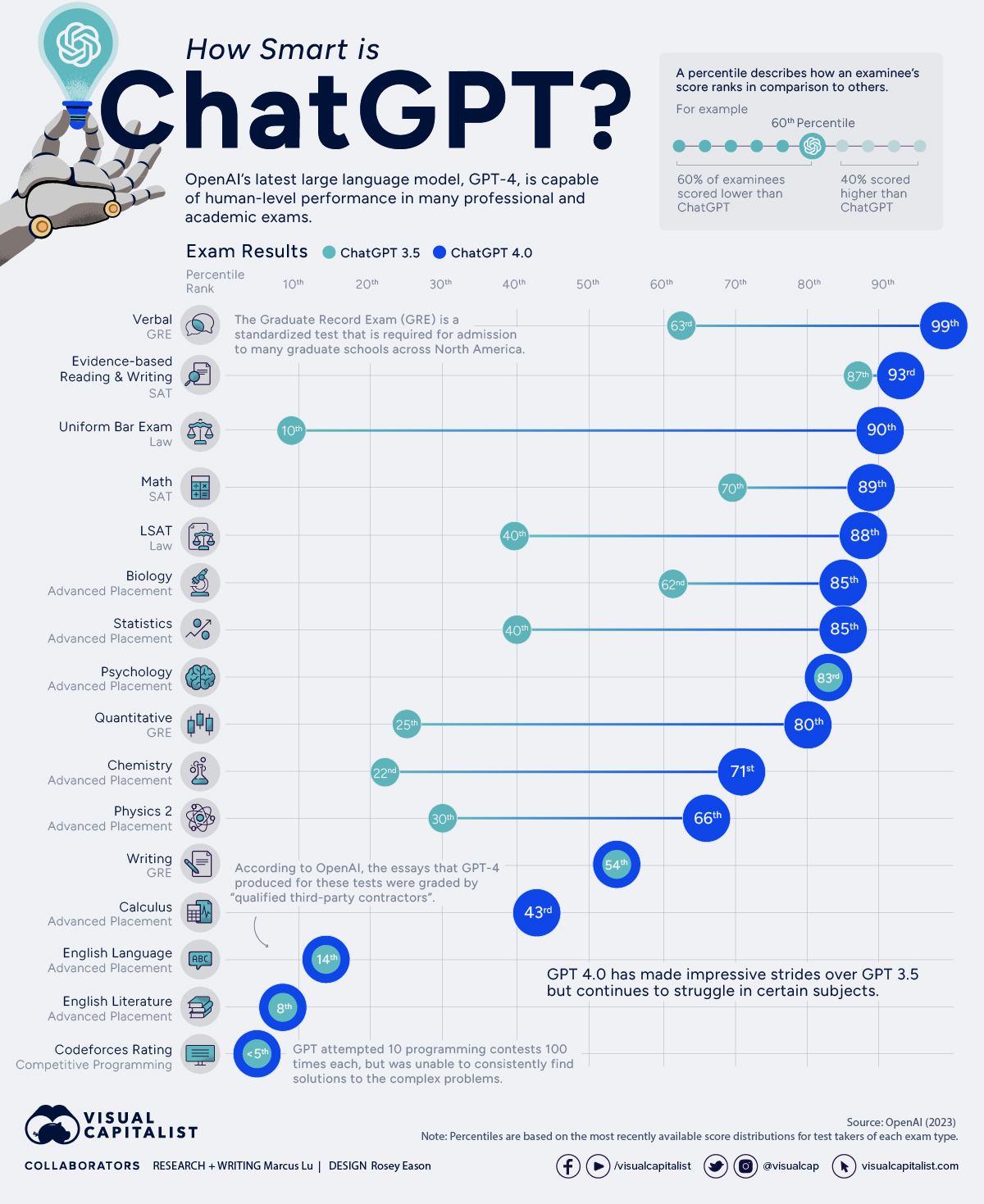
GPT-4o has a “Natural Language Processing (NLP)” function that is even more enhanced than GPT-4 Turbo. In addition, the performance has been significantly improved compared to the previous model, such as improved output speed, response quality, and supported languages.
This allows any combination of text, images, and audio to be seamlessly integrated and processed. When creating materials, you can do everything from collecting data to organizing tables and creating graphs all at once, greatly increasing work efficiency.
How to use ChatGPT-4o
We will explain how to use the “paid version” and “free version” of ChatGPT-4o.
Paid version
How to use the paid version is as follows.
Desktop (web browser)
To use the paid version of ChatGPT-4o on your desktop (web browser), upgrade your plan.
1. Log in to ChatGPT
2.Click the icon “Open sidebar” on the top left of the screen
3.Click “Upgrade Plan” at the bottom of the sidebar
4. Select “Upgrade to Plus” or “Upgrade to Team” to upgrade to the paid version.
Smartphone app
As with the desktop, to use the paid version of ChatGPT-4o on the smartphone app, upgrade your plan.
1. Log in to ChatGPT
2. Tap the “two line icon” at the top left of the screen
3. Tap the “3-point leader” icon from the account field at the bottom of the screen
4. Tap “Subscription” from the menu field
5. Tap “Register Subscription” to upgrade to the paid version
Free version
In the free version, ChatGPT-4o is set by default on both the desktop (web browser) and smartphone app, and users can use ChatGPT-4o from the beginning without doing anything.
However, there is a limit to the number of questions you can ask up to 10 times, and if you exceed that limit, it will automatically revert to ChatGPT-3.5. After that, the usage amount will be reset every 5 hours, and you can use ChatGPT-4o only 10 times every 5 hours.
What is Chat GPT’s GPT-4?
GPT-4 is a natural language processing AI model for text generation AI developed and operated by OpenAI. Let’s take a look at the overview of prices, release dates, etc. Please note that GPT-4 is a paid higher-end model of
released in November 2022.
ChatGPT allows you to ask questions and give instructions in natural language, but if the prompts (words of questions or instructions) are not precise, you may not get the answers you expect. To master ChatGPT, remember
.
GPT-4 is a higher-end model of ChatGPT following GPT-3.5
GPT-4, announced on March 15, 2023, is a higher-end model of ChatGPT following GPT-3 and GPT-3.5. Typos are significantly reduced and the intent of advanced prompts with multiple instructions can now be accommodated.
History of GPT
OpenAI announced GPT (GPT-1, Generative Pre-trained Transformer) in 2018. The following year, in 2019, GPT-2 was announced.
GPT-2 has more than 10 times the number of parameters compared to GPT-1 (1.5 billion; GPT-1 has over 100 million), and the data used for learning has increased to 40 GB. Although these changes improved response accuracy, there were still many problems with long responses.
GPT-3 will be announced in 2020. GPT-3 has more than 100 times the number of parameters (175 billion) compared to GPT-2, and the training data has also increased to 570GB. The accuracy of responses has further improved to the point where it is almost the same as sentences created by humans.
Birth of ChatGPT
In 2022, GPT-3.5, which is the basis of ChatGPT, will be announced. The number of parameters in GPT-3.5 is 355 billion, about twice that of GPT-3, and the model itself does not change as much as from GPT-1 to GPT-2 or from GPT-2 to GPT-3.
However, GPT-3.5 started to be used by more people after it was announced as “ChatGPT”, which has an interface called Chat. GPT is a tool used for text generation and text summarization developed by OpenAI, but it was not provided with an interface that was easy for general users to use.
On the other hand, ChatGPT is a tool that can be used as a chatbot. Therefore, even if you are not familiar with computers or programming, you can simply enter a prompt in natural language in the input field and get the answer as if it were a conversation.
Birth of GPT-4
ChatGPT, which is equipped with GPT-3.5, became a hot topic and became explosively popular, and many people came into contact with OpenAI’s excellent GPT technology. GPT-4, announced in 2023, has dramatically improved accuracy compared to GPT-3.5.
GPT-4 costs $20 per month
GPT-4 is available as a subscription service for general users. If you register for ChatGPT Plus, you will be able to use ChatGPT with GPT-4.
The usage fee for ChatGPT, which allows you to use GPT-4, is $20 per month (as of August 2024). If you are already using the free version of ChatGPT, the following screen will be displayed when you log in and open the ChatGPT page.

Source:
ChatGPT
Click on the “GPT-4” section to display registration information.
Clicking “Upgrade to Plus” will display the registration screen for a subscription service that allows you to use GPT-4. For those who have never used ChatGPT, we will explain how to get started later. You can experience the performance of GPT-4 for free, albeit with limitations, by using Microsoft Copilot (formerly Bing AI: AI chat search of Microsoft’s search service “Bing”).
Please note that GPT-4 is based on training data up to January 2022. Therefore, I cannot give you an accurate answer regarding the information that follows. On the other hand, Microsoft Copilot combines GPT-4 with a search engine that can search in real time, so you can get answers that include new information. When using ChatGPT, please be aware of the time lag of the underlying information.

Features of GPT-4 and differences from GPT-3.5
The following points have evolved from GPT-3.5 to GPT-4.
We will explain how GPT-4 has improved in each respect.
Image input possible
GPT-4 allows you to use images as well as text as prompts. For example, if you enter an image and enter the text, “Please explain what’s strange about this image,” you might get an explanation of what you think is strange about the image.
It can also be used as follows:
It can be used to read graphs, do calculations, and write sentences using materials, so it seems to be useful for writing papers. It can also be used when you simply don’t know the name of something. If you can’t remember or don’t know the name of something, you can easily find out the name by taking a photo with your smartphone and asking ChatGPT (GPT-4).
Supports long texts up to 25,000 characters
GPT-4 can support long sentences of up to 25,000 characters, compared to 5,000 characters for GPT-3.5. Previously, when you wanted to summarize or translate a long text, you had to split the text several times, but GPT-4 supports up to 25,000 characters, so you can summarize and translate it without having to split it. The number of cases has increased.
Improved consistency
“Hallucination”, where the AI makes a mistake, has been significantly reduced, improving the consistency of answers. Because GPT-4 is trained on a broader dataset than GPT-3.5, it has a deeper understanding of questions and is more likely to answer questions and instructions in the way you intended.
Improving Japanese accuracy
GPT-3.5 did not have high accuracy when responding to Japanese, but GPT-4 is now able to provide answers with high accuracy. According to OpenAI’s performance test, the Japanese score of GPT-4 is higher than the English score of GPT3.5, and more natural and highly accurate language understanding and expression can be expected.
Reference:
OpenAI “GPT-4”
Related article:
What is OpenAI? Explaining how to use it effectively as a company!
Improving problem-solving skills
GPT-4 has high accuracy in problem-solving ability, and can generate programming codes and logical sentences more accurately than GPT-3.5. Therefore, it is thought that it has become easier to use it not only in private life but also in business and academic fields.
However, like GPT-3.5, GPT-4 does not understand and answer the questions or instructions themselves. Since content that is likely to correspond to the answer is searched and presented from the language arrangement of the questions and instructions, it is necessary to verify the answers obtained.
What you can do with ChatGPT when GPT-4 is available
ChatGPT, which supports GPT-4, can be used for the following purposes:
The above matters can also be handled with the free version of ChatGPT, which supports GPT-3.5. However, by using the GPT-4 model, this can be achieved more naturally and with higher accuracy. We will explain in detail what you can do with GPT-4.
Trouble consultation/chat
Source:
ChatGPT
It can also be used for troubleshooting and chatting. You may be able to continue the conversation naturally and get appropriate answers to your questions. It is also possible to have conversations based on position and dialect.
For example, you can give instructions such as, “If you were my boss, what advice would you give?” “Please answer in Kyoto dialect.” You can also specify the tone and style, such as “sternly” or “casually”.
Creating emails and manuals
Source:
ChatGPT
We can also create business emails and business manuals. Furthermore, it is possible to proofread sentences, so if you use it when creating emails, papers, and reports to submit to your boss or customers, you will end up with high-quality texts.
However, GPT-4 does not understand and respond to questions and instructions, so it may not be able to produce perfect sentences. Please be sure to check for yourself whether there are any errors in the text obtained by GPT-4 and whether the prerequisite knowledge is accurate.
Summary of text
Source:
ChatGPT
Long summaries of up to 25,000 characters are possible. For example, you can use it when you want to create a summary of a business book or novel. GPT-3.5 had a maximum of 5,000 characters, so when entering long sentences with GPT-4, the effort of copying and pasting is greatly reduced.
Creating quiz questions
You can create quiz questions based on requirements and themes. For example, you can request quizzes such as:
It may also be useful when giving quizzes at events or creating small questions to check children’s learning proficiency.
Code generation for programming
It is also possible to generate code for programming. It also supports programming language specification and code bug checking.
However, since they do not understand programming and perform code generation and code checking, there is a good chance that there will be mistakes. Please have someone who is proficient in the specified programming language perform the final check.
Idea suggestion
GPT-4 allows you to propose creative and diverse ideas based on the vast knowledge of training data. It can also be used when you can’t come up with a new idea for business, or when you can’t think of a new theme for personal activities such as blogging.
When you can’t come up with a marketing idea, you can also get hints by referring to the handbook. Please download and use the BtoB marketing guide for free below.
Things you can’t do with ChatGPT
Things that ChatGPT cannot do include:
I cannot answer the latest information.
ChatGPT cannot respond with the latest information. For example, if you ask the question, “Who is the current Prime Minister of Japan?” as of December 2023, you will be asked, “My knowledge was last updated in January 2022, so it is not possible to provide the latest information about the current Prime Minister of Japan.” “No,” is the answer.
It then goes on to say, “For the latest information, please refer to reliable news sources and official government announcements,” prompting you to check with reliable media. At this time, GPT-4’s ChatGPT is unable to respond to information from January 2022 onwards.
However, in the new version of ChatGPT, “GPT-4 Turbo,” announced in November 2023, which will be described later, the learning data has been updated to April 2023.
I can’t make a decision
ChatGPT also cannot provide answers that require you to make a decision. For example, if you ask the question, “I’m on a diet. Can I eat the cake in front of you?” the answer will be as follows.
“Food choices are important if you’re on a diet, but giving in too much completely can also cause stress.”
After the above generalizations are made, the patient is urged to consult a doctor, saying, “For your specific situation, we recommend that you consult with a nutritionist or doctor.”
They also cannot answer simple questions such as “What do you want to do?” If you ask such a question, you will be answered as follows:
“I’m a program, so I have no emotions or desires. I can just answer questions and provide information.”
From the examples above, it can be said that it is almost impossible to answer questions that leave your judgment to ChatGPT.
Cannot answer questions that are ethically or morally problematic
ChatGPT will not be able to answer questions that are deemed ethically or morally problematic. If you ask such a question, it will be answered as follows:
“I do not support acts of violence for ethical reasons. Violence violates human rights and is morally unacceptable.”
Similar answers will be given to other questions regarding racism, discriminatory remarks, and hate speech.
Unable to answer privacy questions
ChatGPT cannot answer questions regarding privacy. For example, if you ask the question “Where is 〇〇-kun?”, the answer will be as follows.
“Unfortunately, I cannot provide the location or personal information of specific individuals. To respect and protect individual privacy, we must treat other people’s personal information with care.”
You will be asked to be careful as above. Other questions related to personal privacy, such as “Tell me your address” or “Tell me your secret,” will all have similar answers.
Points to note when using ChatGPT
When using ChatGPT, there are several points to keep in mind. These are the following items.
May give incorrect answers
ChatGPT is a system that simply collects information on the Internet and provides answers to questions by assembling them in an easy-to-understand manner. Therefore, it is not possible to determine whether the collected information is accurate or not. Often, incorrect information is collected and assembled into an answer.
For example, when asked, “What was the cause of Tokugawa Ieyasu’s death?” the answer was “Ieyasu lived a long life and died at the age of 78.” Since the exact cause of death has not been determined and no medical autopsy has been performed, “The underlying disease or cause is unknown.”
There are various theories, but the information released based on the Edo Shogunate’s official history book “Tokugawa Miki” states that “Ieyasu passed away at the age of 75, and the cause of death was stomach cancer.” Given these characteristics, it can be said that humans should carefully check the authenticity of ChatGPT responses and make the final judgment.
Be careful when handling personal information
ChatGPT has no measures or guarantees to protect confidential or personal information, so providing such information to ChatGPT involves risks.
Although it is said that ChatGPT does not have the ability to retain or remember information, it has been pointed out that its security is vulnerable, and this is still a cause for concern. It is safest not to enter your ID or password when using it.
<h3>You may make a mistake in calculation</h3>
ChatGPT sometimes makes calculation mistakes. For example, if you ask “123,456 x 123,456 =”, the answer will be “123,456 x 123,456 is approximately 15,241,005,136”. However, this answer is incorrect and also includes the word “about” in front of the number.
There should be only one answer, but we have to judge that it gives an approximate number. By the way, the correct answer to the above formula is “15,241,383,936”. For these reasons, it is better to do the calculations yourself.
How to get started with GPT-4 with ChatGPT
The steps to use GPT-4 with ChatGPT are as follows.
1. Create an account
2. Upgrade to ChatGPT Plus
3. Select the GPT-4 model and start using it
1.Create an account
Source:
ChatGPT
First, let’s access the official ChatGPT page. If you enter “ChatGPT” into your browser’s search window, OpenAI’s official ChatGPT page will be displayed at the top. If you have already used ChatGPT, please use GPT-4 using the method described above.
If you have never used ChatGPT, create a new account. Below are the steps to create an account.
1. Access the official ChatGPT website as mentioned above.
2. Click “Sing up” from the home screen
3. Enter your email address and click “Continue”
4. Check “Verify that you are human”
5. You will receive an email from OpenAI, so click “Verify email address”
6. Enter your name and click “Continue”
7. Enter your phone number and click “Send code”
8. A verification code will be sent to you via SMS. Enter the verification code.
9. Enter the purpose of use to complete registration.
In addition, above we introduced how to register an email address, but you can also log in with a Google account or Microsoft account. Additionally, once you create an account, you can use the free version of ChatGPT, so we recommend trying it out.
2.Upgrade to ChatGPT Plus
After completing the free registration, the next step is to sign up for the paid version. If you enter the information below, check the consent statement, and apply, you will be able to use GPT-4 with ChatGPT.
The specific steps are as follows.
1. Log in to ChatGPT
2. Click “Upgrade to Plus” in the menu on the left side of the screen
3. Alternatively, select “GPT-4” displayed on the screen and click “Upgrade to ChatGPT Plus”
4. When the “Your plan” screen appears, click “Upgrade to Plus”
5. You will be redirected to the input screen for credit card information, etc., so enter each of them (the email address used when creating the account will be automatically filled in).
6. Click the “Apply” button
7. “Payment received! Click continue to begin using your ChatGPT Plus account.” will be displayed and registration will be completed.
3. Select the GTP-4 model and start using it
Once the ChatGPT Plus contract is completed, you will be able to use GPT-4 by following the steps below. The basic usage of GPT-4 is the same as the free version.
1. Log in to ChatGPT
2. “GPT-4” will be selectable at the top of the chat screen, so click “GPT-4”
3. Fill in the prompts
Services equipped with GPT-4
ChatGPT is not the only service that can use GPT-4. We will introduce some paid and free services that are equipped with GPT-4. Please feel free to use it and check out the performance and capabilities of GPT-4.
Microsoft Copilot (formerly BingAI)
Microsoft Copilot
is a free generative AI service provided by Microsoft. The former name was BingAI, but it has not become a separate product service, and BingAI continues to be updated and continues to provide even better services than before.
“Copilot” means “co-pilot” in Japanese, and Microsoft, which positions this service as “the user’s AI companion,” can be said to have named it with the user’s role as a good companion in mind. Microsoft Copilot is free to use and has many features.
Bing is a search engine made available to the public for free by Microsoft. Copilot, like ChatGPT, lets you give instructions and ask questions using natural language prompts. Also, while ChatGPT creates answers based on the information it has, Copilot searches in real time and creates answers, so it can also respond to new topics and news.
Copilot is compatible not only with computers but also with both Android and iOS. You can also use it when you want to easily check the performance of GPT-4.

Source:
Copilot
Be My Eyes
Be My Eyes
is a service from OpenAI that was developed to support people with visual impairments and low vision. Through real-time video calls, we connect people with vision problems with volunteers to provide visual assistance.
For example, we support people who have vision problems in various situations in their daily lives, such as checking whether the lights are on or coordinating their clothes. Furthermore, it is compatible with both Android and iOS and is available for free.

Source:
Be My Eyes
Duolingo
Duolingo
is also a service from OpenAI and is a language learning app. Over 100 courses available in 40 languages.
Duolingo combines AI and linguistic chemistry to create personalized learning tailored to each individual. Another feature of the program is that everyone can learn at a level and speed that is suitable for them, allowing them to learn efficiently. Why not try learning a language with Duolingo, which has over 100 million users worldwide.
Source:
Duolingo
Tome
Tome
is a service that creates presentation materials for presentations at companies and research groups. You can use it for free, but since it is a credit system, if you want to use it over and over again, you will need to apply for a paid plan such as Pro. Paid plans can be used without restrictions and can be recreated as many times as you like.
Additionally, although the service itself is in English, you can create materials in Japanese by entering Japanese prompts. You can create a presentation simply by entering the necessary information in text, so you can spend more time preparing your presentation.
Source:
Tome
Ircil
Illusil
is an automatic slide generation service equipped with AI. Using AI, you can intuitively and quickly create slide materials for use in business settings, meetings, etc., significantly reducing the time required to create slide materials and making them more efficient.
There are over 1,000 design templates available at all times, so you don’t have to come up with your own design and can use them according to the occasion. Since it is equipped with AI, original slides are automatically generated from the input text.
Rakulin
Rakulin
is an AI tool that specializes in creating and generating blog articles. By using Raklin, you can have users create sentences on your behalf or suggest article ideas. There is also a keyword suggestion function that allows you to discover treasure keywords and niche keywords that are difficult to find on your own.
Furthermore, you can automatically create lead sentences and headlines necessary for posting blog articles, and create descriptions for SEO. Equipped with AI, it creates more natural and accurate sentences.
Coze
COZE
is a platform that can easily and easily develop AI chatbots. You do not need programming knowledge, you can create a full -fledged AI chatbot with intuitive operations. The prompts are automatically generated by COZE, saving users to create prompts and effort.
It also offers a wealth of plug -ins that can extend the bot function, enabling visual interaction using images.
PoE
PoE (Po)
is an AI platform for individuals. You can create AI chatbots by using PoE (Poe), and you can search and use AI chatbots created by others. In addition, there is also the simplicity that can be used intuitively, such as being able to convert to AI chatbots simply by uploading PDF.
PoE (Po) is one of the characteristics that it has a relatively high performance, such as being able to speak fast and can talk with multiple bots. It also has a “suggestion function” that is not found in the original Chatgpt.
Leeton
Riton
is an AI app that allows you to create your own AI character and have a chat function. Since this created AI character has a personality, setting a persona can be tailored to the AI character according to the purpose and application.
For example, if you use it for elementary school education purposes, you will have an intelligent anime character that can support learning and a loose character that will give you any advice. It also has a high -quality image generation function, so you can use the image to make it easier to understand.
[2024] A newly added function to CTATGPT
Chatgpt has a function at any time. Introducing the features added in 2023 and 2024.
Memory function (added in 2024)
Chatgpt has a new memory function on February 13, 2024. The memory function is a function that can be remembered each time the Chatgptt is judged to be important at its own discretion, and provides more relevant answers immediately.
With this memory function, you will be able to provide information tailored to each user, so that you will be able to respond to the individual taste and preference.
“History display” off function (added in 2023)
In the past, the usage history was displayed on the left side, but a function that can turn off the history display has been added, and information leakage measures have been strengthened. However, to prevent unauthorized use, a new chat history is maintained for 30 days.
Web browsing plug -in function (added in 2023)
For Chatgpt Plus users, the beta version has a web browsing function. If you turn on Web browsing, you will get an answer based on the latest information. In addition, a plug -in function has been added, making it possible to cooperate with other apps.
Summary: Understand the features and make good use of GPT-4
By understanding the features of the GPT-4, you can use the paid version of Chatgpt more altitude. Please use the GPT-4 by referring to the information introduced.
In addition, GPT-4 can be used other than ChatGpt. Free services such as Microsoft Copilot can be used more easily. Please give it a try.