


Nowadays, many companies are holding webinars. Webinars have benefits for both organizers and participants, and can be held in a variety of formats by taking advantage of their
online
nature.
This time, we will explain the format of a webinar using Zoom, a typical webinar tool, as an example.
What is a webinar?
A webinar
is a seminar held online or a tool for conducting a seminar. Some people call it an online seminar or web seminar, a coined word that combines the words “web” and “seminar.”
Using the webinar tool, participants access the link sent by the host. On that link, the host will share their screen with participants and host the webinar. Unlike a web meeting, participants’ faces are not visible and only the host can operate the microphone and screen.

Unlike offline seminars, there is no time or expense involved in traveling to the venue, so the burden on both participants and organizers is light, and many companies are now holding seminars.

Differences from web meetings
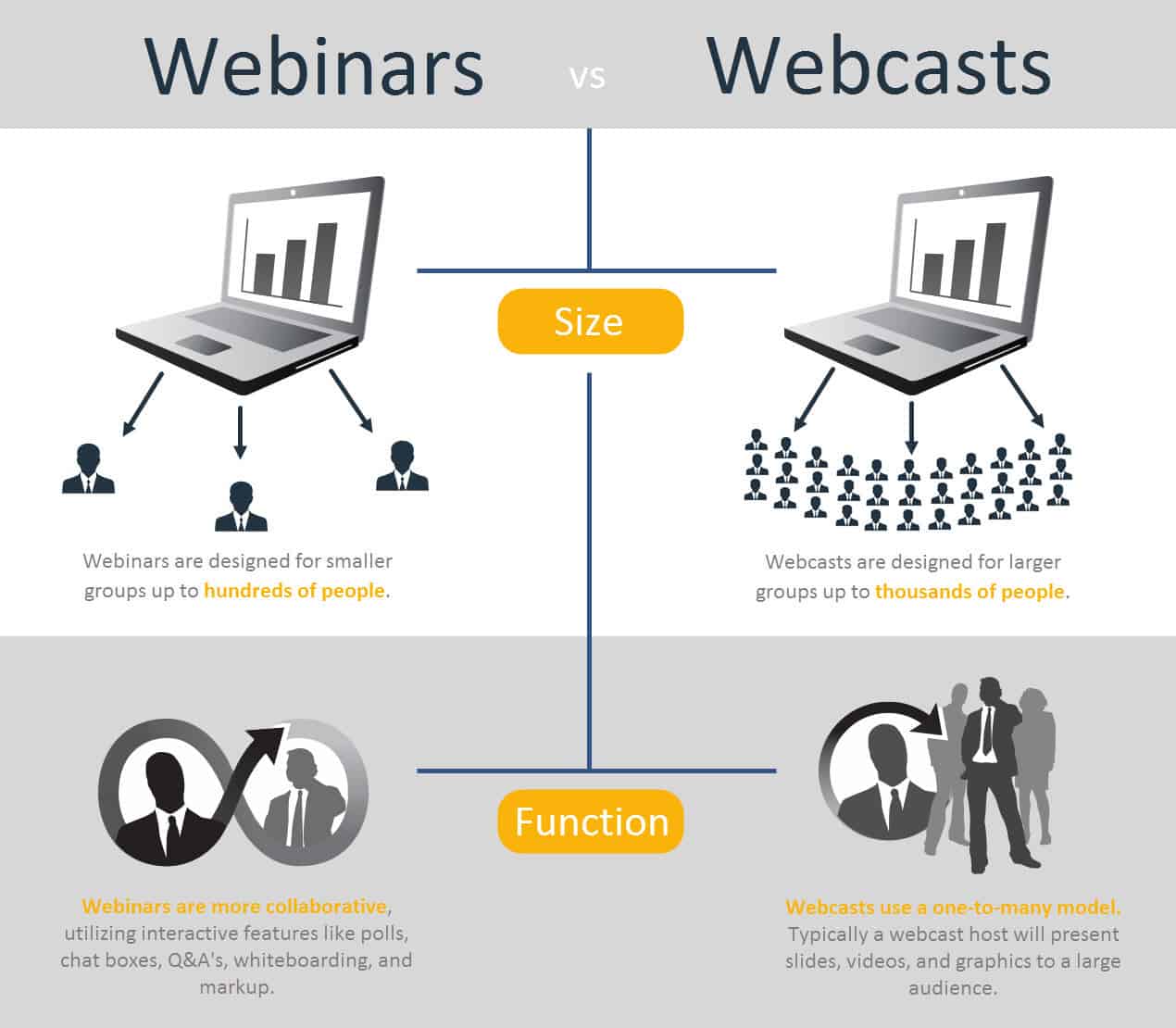
The difference from a web meeting is also the size of the participants. Using Zoom, a popular webinar tool, up to 10,000 people can participate. Large-scale events that were difficult to hold offline can now be held via webinar.
Also, web meetings tend to be thought of as two-way communication, while webinars tend to be thought of as one-way communication.
However, by using the functions of the webinar tool, you can use the voting function to take a survey during the webinar, ask questions using the QA function, and realize interactive communication.

Representative webinar tool Zoom
Zoom is a popular webinar tool and is used by many companies. First, after signing up for Zoom meetings, you will be able to use Zoom video webinars as an add-on. Monthly pricing starts at 2,000 yen for Zoom meetings and 10,700 yen for Zoom video webinars.

Difference between Zoom Meeting and Zoom Video Webinar
Zoom meetings are used for internal meetings such as
1on1
and group meetings, online business negotiations, online interviews, and other web meetings. All attendees’ faces will be visible, but all attendees can control the camera, microphone, screen sharing, etc. Up to 500 people can use it at the same time.
On the other hand, Zoom video webinars are divided into a host, panelists (presenters, etc.), and participants, and only the host and panelists can operate the camera, microphone, screen sharing, etc. Also, the participants’ faces will not be shown.
How to use Zoom video webinar
A Zoom video webinar is divided into three parts: webinar settings (basic settings/optional settings), inviting panelists/issuing participation links, and managing the day.
First log in to Zoom and then access the Zoom video webinar. Register your schedule on the displayed screen and set the webinar to be held. Then set the following options as needed:
- Regularly held webinars: A feature that allows you to repeat the same session
- Password settings: A feature that requires participants to enter a password when accessing a link.
- Required registration: A feature that requires you to enter your name and email address when participating.
- Practical session: A rehearsal function that is held only by the host and panelists before the event.
- Others: Q&A, survey functions, on-demand functions, etc.
→By using this feature, you will be able to log participation times, etc. →You can test the camera and microphone to prevent trouble during the performance.
Once the webinar settings are complete, we will issue panel list invitations and links for participants. Please note that panelists will need to access via the invitation email from Zoom.
On the day of the event, we will open the Zoom video webinar and conduct the webinar using functions such as screen sharing, voting, and QA.
For more information on attracting customers for webinars, please refer to this article.

Webinar delivery format
Webinars can be held in a delivery format that takes advantage of the characteristics of online.
Real-time (live) distribution

This is a webinar held in real time at a pre-set date and time. Since it is a live broadcast, you can create an interactive webinar by conducting surveys on the spot, answering questions from participants, and watching the reactions of participants.
The disadvantage is that the webinar is held at a fixed time, which limits both the organizer and participants.

Recorded distribution/archive distribution (on-demand/download)
This is a webinar in which a pre-recorded video (recorded delivery) or a video recorded from a real-time webinar (
archived
delivery) is delivered at a set time. Recording is easy with Zoom Video Webinar’s on-demand feature.
Organizers can brush up on their content, and participants have the advantage of being able to watch at their own time. However, this results in one-way communication rather than two-way communication like real-time streaming.
Furthermore, it is divided into two viewing formats: on-demand format, which is delivered online, and video downloaded to a device for viewing, which is stored in the cloud.
On-demand distribution can be viewed without downloading, but an internet environment is required. Downloads can be viewed without an internet connection, but you will need to save them.
summary
We introduced how to use Zoom video webinars as well as the format for holding webinars. Webinars can be held in an appropriate format depending on the purpose of the event and the needs of the participants. Make your webinar a success by making the most of Zoom video webinars.