

Instagram is a platform where many users around the world share photos and videos. It is widely used as a communication app between friends like Twitter and Facebook, and as a business place to send out Instagram advertisements, but what exactly is Instagram? There seem to be many people who want to know in detail how to operate it.
In this article, we will explain everything from login and search operations to how to delete your account in an easy-to-understand manner for beginners who are just starting out on Instagram.
What is Instagram?
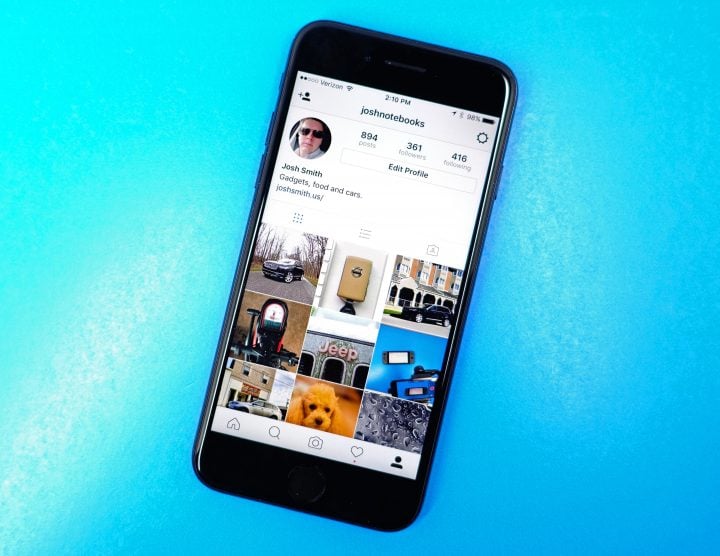
“Instagram” has given rise to buzzwords such as “instagrammable” and “instagrammer.” Instagram is an SNS (social network service) specialized in photos and videos provided by Meta Platforms (formerly Facebook).
Instagram was originally an existing location information app called Burbn, which was improved and developed into a photo sharing service by adding new features such as visual editing.
Instagram overview
After appearing on Apple’s App Store in 2010, it quickly spread around the world, and in 2012, Instagram was acquired by Facebook at the time. A Japanese account was opened in 2014.
In 2019, it was officially announced that there were approximately 33 million monthly active users in Japan and over 1 billion worldwide.
The special features of Instagram include the ability to edit the visuals of photos and videos using the default (pre-installed) editing functions to create attractive images, and the fact that many stylish photos and videos are posted. is.
Instagram user demographic
Instagram is a platform that is used by a wide range of users, mainly people in their 20s to 40s, but also teens, 50s, and 60s.
The male-to-female ratio of Japanese users is said to be 57% female and 43% male, making it an SNS that is used slightly more by women.

What is Instagram advertising?
Instagram allows you to share all kinds of photos and videos, from personal to business. An increasing number of companies are incorporating highly visually effective Instagram ads for branding and promotion.
To put it simply, an Instagram ad is an ad that displays a specific product or service on your timeline or feed. Users see Instagram ads on a daily basis, so “photo ads,” “video ads,” and “story ads” naturally increase awareness of products and services, which can lead to customer attraction, purchases, and business opportunities. .
As Instagram strengthens its shopping features, Instagram advertising will become an increasingly important advertising medium, similar to “influencer marketing,” which introduces products and services within the community.

How to log in to Instagram?
To log in to Instagram, both individual users and businesses planning to run Instagram ads must first register and open an account. If you use a smartphone such as an iPhone or Android, be sure to install the app.
You can also register from the web version of Instagram (
https://www.instagram.com/
). In either case, register your mobile phone number or email address, or log in to Facebook from the same screen and link it with Instagram to open and register your account.
Registration and opening of account
Instagram accounts are divided into “personal accounts” and “professional accounts,” and professional accounts are further divided into two categories: “business” and “creator.”
You can switch accounts at any time by going to “Edit Profile” or “Accounts” in “Settings”. Since you can choose one yourself, you should understand that business accounts are for companies that run Instagram ads, etc., and creator accounts are for individuals who are engaged in creative activities, such as celebrities, influencers, artists, etc.
Causes and solutions for not being able to log in to Instagram
Even if you try to use Instagram, you may find yourself unable to log into your account for some reason. The causes and solutions for not being able to log in include the following:
The login information (user name and password) is different.
You may be unable to log in due to differences in uppercase/lowercase letters or input errors. Please double check that you have entered the correct username and password.
Unable to log in automatically after changing the model
After changing your smartphone model, you may receive an error message when trying to log in to Instagram. This is an issue that can occur if you don’t log out of Instagram before making the change and try to log in on your new phone.
Uninstall the Instagram app on your new device, reinstall it, and try logging in using the username and password you originally registered.
I can’t log in because my account has been hijacked
If you suddenly can’t log in, your account may have been hijacked by someone. Please be careful if you set a simple password and reuse it, or if you register a widely known email address, as your account may be hijacked.
If you can log in to your Instagram account, you can change your password as is, but if you can’t log in, the procedure is different.
Select “Help regarding login” from the first login screen to display the “Sign-in help” screen. From “Username or Email Address”, tap “Search” on the “Identify Account” screen and select how to reset your password.
If you can’t log in to Instagram for any other reason, select “Help” from the settings screen and search for your problem. If you tap “Troubleshooting and login help,” you can find troubleshooting options for each menu.
If you can’t find a solution after searching and can’t log in, select “Need help?” from the login screen, then contact Instagram from “Let Instagram know” on the account assistance screen. If you select the current status of the problem, such as “Unable to access your account,” and send it, it will be reported to Instagram.
If you still can’t log in no matter what you do, there may be some kind of problem with Instagram itself, so it’s a good idea to check whether the problem is temporary or not.
How to prevent Instagram from being hijacked
Here are some ways to prevent Instagram from being hijacked:
Enable two-step verification
One of the effective ways to prevent Instagram from being hijacked is to use two-factor authentication. Two-step verification means that when a user logs into their account, they enter their login information to perform the first step of authentication, and then enter the security code issued by Instagram to perform the second step of authentication. . The security code is sent via SMS, so only you can receive it. If you use two-step authentication, you will not be able to log in unless you are authenticated to the second step, and you can expect a very high level of security just by using this function.
Change your password to something more complex
Two-factor authentication is a very advanced and effective security feature, but some people may find it a hassle because they have to use email. In such cases, changing your password to a more complex one is an effective method.
It is a well-known fact that simple passwords and birthday passwords can be easily cracked, but people who set passwords that are easy to associate with their accounts even if they are a little complex, or who use keyboard layouts as passwords, etc. They tend to be easily breached.
People who have their keyboard layout set as a password are especially at risk; for example, to make it easier for them to remember, they can write “1qaz” on the left side of the keyboard in order from the top in the first row and “2wsx” in the second row.
If you also set a password like “1qaz2wsx”, there is a high possibility that it will be unlocked. The opinion of those attempting to log in illegally is to try all these keywords first, and there is a risk that they can be easily breached.
Don’t reuse passwords
Not reusing passwords is an obvious but effective measure. Police are also calling for caution when it comes to reusing passwords from the perspective of preventing unauthorized access.
If you reuse passwords and your information is leaked from one of the services you use, there is a high possibility that unauthorized logins will occur to other services one after another. Also, by reusing passwords, you may fall victim to a “password list attack.”
A password list attack is a type of cyber attack in which a criminal attempts to gain unauthorized access using a list obtained from somewhere. This can lead to “hijacking of SNS” and “leaking of personal information.” In order to avoid becoming a target of such damage, it is necessary to avoid reusing passwords.
Delete/pass through suspicious DMs
A wise way to deal with suspicious DMs is to simply delete or ignore them. Suspicious DMs may be phishing scams, and there is a risk that you will be directed to a phishing site. If you enter your personal information on a fake website that is indistinguishable from a genuine corporate website, your personal information may be leaked and misused. In order to avoid such damage, we will delete or pass any DM that we feel is suspicious.
Change email address
Changing your email address is also an effective method for account takeover. On Instagram, your user ID is easily visible to other users, but your email address is not. You can strengthen your login information by using an email address that is separate from your important personal main address.
Do not blindly integrate with third-party apps
Not blindly linking with third-party apps is also an important measure to prevent account takeover. Even if there are no issues with Instagram, your information may be leaked from third-party apps you use.
Although it is rare, free apps that intentionally incorporate malware may be uploaded, and if you install such malicious apps, you may be infected with the malware.
If this happens, your passwords, IDs, and other personal information on your device may be stolen. It is best not to use apps whose distributors are unknown or whose purpose is unclear.

What to do if your Instagram is hijacked – If you can log in
If you receive a login notification from Instagram that you don’t recognize or find suspicious login history, your account may have been hijacked. If you are able to log in after realizing that your computer has been hijacked, immediately take the following measures.
change password
If you change your password and log out immediately after being hijacked, the hijacker will not be able to log in again. The key is to change your password to another one as soon as possible.
Cancel linked apps
If you notice that your account has been hijacked, change your password and temporarily cancel all linked apps. There are various possible situations, such as cases where a linked app is doing something wrong, or cases where an unfamiliar app is unknowingly linked, so we will resolve all of them once.
If you want to link them again, instead of linking the existing apps exactly as they are, carefully select only the necessary apps again and carefully check their safety before linking them.
What to do if your Instagram is hijacked – If you can’t log in
If you can’t log in after realizing that your Instagram has been hijacked, try the following methods.
Reset password
By resetting and changing your password as soon as possible, you can prevent the hijacker from logging in again. As with “changing your password” in the item above, the key here is how quickly you can do it.
Contact support and wait for instructions
Instagram has a support page for when your account has been compromised, so you can report it there and wait for instructions.
■Instagrams support page (
https://help.instagram.com/368191326593075/?helpref=hc_fnav
)

How to reset your Instagram password if you forgot it
We will explain the following three ways to reset your Instagram password if you forget it.
For iPhone smartphones
1. From the Instagram login screen, tap “Forgot your password?” at the bottom right of the screen.
2. The screen will move, so enter your email address, phone number, or username and tap “Send login link”
3. An email with a link will be sent to your registered email address.
4. Open the email and tap “Reset password”
5. You will be redirected to the website where you can reset your password, so enter your new password and tap “Reset password”
For Android smartphones
1. Tap “Security” → “Password” from Settings
2.You will be redirected to the password reset screen, so tap “Click here if you have forgotten your password”
3. An email with a link will be sent to your registered email address.
4. Open the email and tap “Reset password”
5. You will be redirected to the website where you can reset your password, so enter your new password and tap “Reset password”
For PC (web version)
1.Click “Forgot your password?” from the login screen
2.The screen will move, so enter your email address, phone number, or username and click “Send login link”
3. An email with a link will be sent to your registered email address.
4. Open the email and click “Reset password”
5.You will be redirected to the website where you can reset your password, so enter your new password and click “Reset Password”

How to search Instagram?
To search on the Instagram app, you must be logged in to your account. After logging in, use the magnifying glass icon to display the search window and enter the keyword you want to search for. Tap icons such as “Account Search”, “Music Search”, “Hashtag Search”, and “Spot Search” to display related photos and videos.
You can view some of the photos without logging into Instagram by searching for the username on Google and accessing the profile page directly.
Also, if you want to see photos and videos posted without logging in, please remember that you can search and view them from analyzer sites such as “Gramhir/Gramho” and “DUMPOR.”

How do I delete my account?
If you wish to withdraw from Instagram, you will need to not only log out but also delete your account. If you delete your account, all data, including searched information and posted photos and videos, will be deleted after a 30-day grace period.
Please be aware that even if you delete your Instagram account and then create a new one, you will not be able to use the same account name. If you want to keep your previous data, select “Security” from “Settings” and tap “Request download” on the “Download data” screen. An email will be sent to you from where you can download it.
The key to Instagram is that if you log in within 30 days of deleting your account, it will be restored and you can use it as before. In the case of “pause”, if you log in to Instagram again, all data will remain as before the suspension.
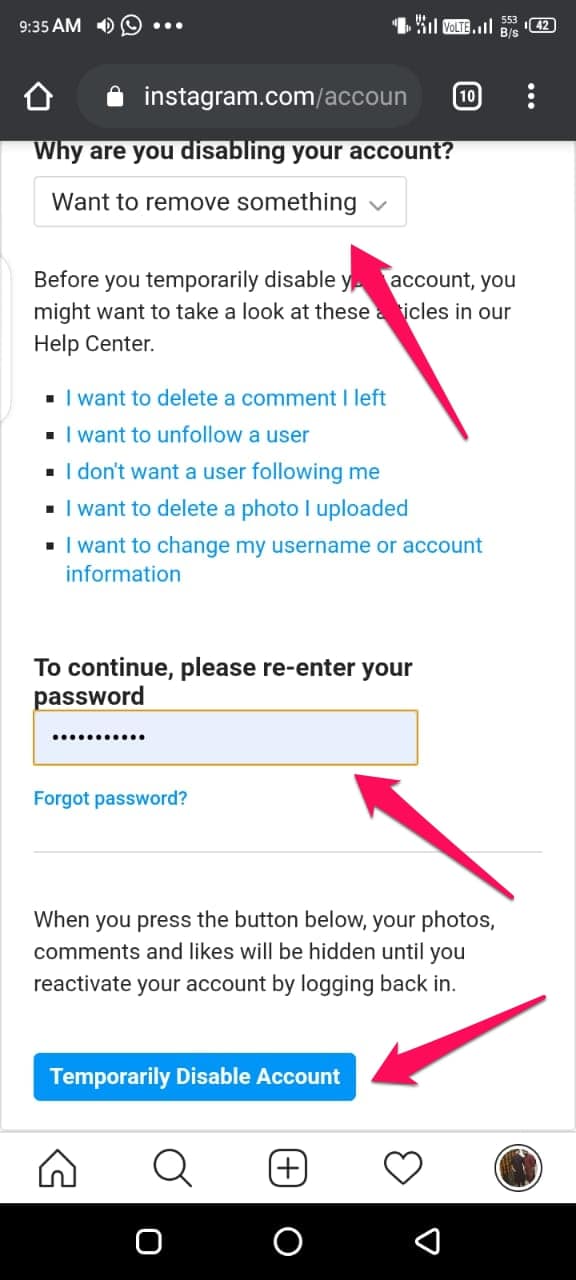
If you are unsure about deleting your account, you may choose to temporarily suspend your account.
Where is the account deletion page?
“Account deletion (withdrawal)” is performed on a dedicated web browser page.
Select “Manage Account” from the Help Center menu on your Instagram profile page and tap “Delete Account” to display the account deletion page.
Select “Reason for deleting your account” and enter your password.

summary
Instagram is a SNS specialized in photos and videos provided by Meta Platforms. Anyone can easily process photos and videos using the default functions.
In this article, we explained “What is Instagram?”, “How to log in to Instagram/What to do if you can’t log in,” “Search procedures,” and “How to delete your account.” First, master the basic operations and how to use it, and try out the creativity that can only be found on Instagram.