

Instagram is one of the most popular social networking sites. It is an SNS that focuses on visuals, mainly posting photos and videos.
However, there are various ways to search on Instagram, and some people are worried about how to search on Instagram, such as “I can’t find the account I want to search for” or “When I search, there are so many posts that I can’t catch the one I’m interested in.” There are many users who end up with this problem. Instagram is supposed to be a convenient way to catch up on information, but it becomes meaningless if you don’t utilize it.
Therefore, in this article, we will explain the overview and types of Instagram’s search function, and how to perform a search. Please read this article and get the most out of Instagram.
What is Instagram?
Instagram is a social media platform for sharing photos and videos, and although it is also possible to post texts, it is primarily a tool for enjoying photos and videos. Not only do ordinary people enjoy posting on Instagram, but celebrities and companies also use Instagram to disseminate information and spread awareness.
There are also other SNS such as Twitter and Facebook, but Twitter is mainly used for posting short texts, while Facebook is a SNS that requires real name registration and is often used for business. . Instagram is a popular site for many people because it can be used anonymously and people can enjoy posting photos.
According to Facebook’s “Newsroom,” the company that operates it, the number of Instagram users (monthly active accounts) in Japan exceeded 33 million as of March 2019. The number of users in Japan is second only to Line in first place and Twitter in second place, and exceeds Facebook (26 million users as of July 2019).

What is Instagram’s search function?
Instagram’s search feature is very important for users to find specific content.
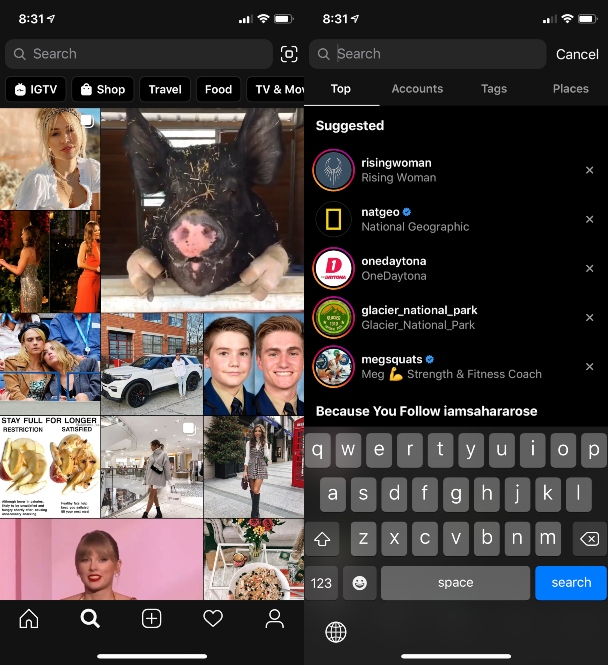
You can display the search screen by tapping the magnifying glass mark that appears at the bottom of the Instagram screen. By using Instagram’s search function, you can use Instagram conveniently and enjoyably, such as by following your favorite celebrities and catching up on the information they are sending out, or catching information on tourist spots you want to visit. Masu.
Instagram’s search function is available if you have registered
an account
with the app and are logged in. You cannot search if you do not have an account and cannot log in.

Search type
From here, we will explain the types of searches on Instagram. The main types of searches are as follows.

Account search
This feature allows you to search for the account itself by searching for a specific person or brand. When you enter a name or username in the search bar, related people will be displayed.
The steps to perform an account search are as follows.
Step 1: Enter the account name you want to search. Enter the account name in the search box (located at the top of the search screen).
Step 2: Go to the profile screen If the account you want to search for is displayed, tap it. Tap to view the profile.
One thing you should be careful about is “spoofed accounts”. There are also accounts that impersonate popular accounts such as entertainers and celebrities. You must be extremely careful as they are being used maliciously to steal your personal information.
:max_bytes(150000):strip_icc()/Rectangle9-78790c5f854846439a60315fe61797d1.jpg)
Hashtag search
It’s an important way to find posts related to a particular topic or interest. Users can search for related hashtags by entering a keyword followed by “#” in the search bar. For example, by using a keyword like “#cafe”, it will be recognized as
a tag
. It is also used to find posts related to specific trends or events.
The steps to perform a hashtag search are as follows.
Step 1: Enter the keyword you want to search Enter the content you want to search in the search box (at the top of the search screen) in the form of “# + keyword”.
Step 2: Tap the tag you want to search. When you tap “Tags”, various hashtags related to what you entered will be displayed, so tap the one you are interested in and check the content.
Spot search
This is a useful feature when finding posts related to a specific place or tourist destination. Type the name of a place in the search bar to see related content. You can use it when planning a trip or when you want to know the atmosphere and popularity of a particular place.
The steps to perform a spot search are as follows.
Step 1: Enter what you want to search Enter the location you want to search in the search box (located at the top of the search screen).
Step 2: Tap the store or location you want to search for. Tap “Spot” to display a map of the related location. Various shops and locations will be displayed, so you can check the details by tapping on the one you are interested in.
Unlike hashtag searches, you can search for things like “Harajuku sweets” and “Osaka lunch”, which is useful when looking up places you want to go.
When performing a spot search, there is a function that uses location information services to search for photos and videos around your current location, so you must allow the use of location information. If spot search is not available, be sure to check the settings for location services, etc.
Map search
This feature allows you to search for posts related to a specific region or location on Instagram. You can search for a specific location by selecting a specific area on the map or by tapping the map search icon. It can help you find trends and popular spots in a particular region, or find content about a particular event or activity.
The steps to perform a map search are as follows.
Step 1: Enter what you want to search Enter what you want to search into the search box (located at the top of the search screen).
Step 2: Tap “Map” By tapping “Map”, a map of the location related to your search will be displayed. (A map icon may be displayed to the right of the search window.)
Step 3: Tap the store or location you want to check details about. Nearby stores and spots will be displayed, so you can check the details by tapping on the one you are interested in.
QR code search
This is a useful feature that allows you to access other people’s profiles. You can use Instagram’s camera feature to scan QR codes on other people’s profiles and posts. Easily connect with specific people or find specific content.
The steps to perform a QR code search are as follows.
Step 1: Read the QR code If you have a shared QR code, you can save the QR code on your smartphone and read the QR code from the search screen. Alternatively, you can scan the QR code by using the QR code reading mark on the top right of the search screen.
Step 2: Scan the QR code Once the reading is complete, the other party’s account will be displayed. You can also follow them from there, so you can interact with them in the future, and you can check their posts from time to time.
Top search results
Search results tend to show popular accounts and content at the top. The official Instagram
homepage
also states:
How search results are ranked
The search feature is designed to help you find accounts and topics of interest. It differs from Feed, Stories, Reels, and Discover in that it uses the text you enter to figure out what to display. The search function searches for the text you enter. If the search results aren’t helpful, you’ll know right away. Our focus is on getting you the right search results. We do this by sorting your search results by the most relevant to you, such as your closest friends, favorite creators, or vegan dessert tips.
Reference:
Official Instagram Detailed mechanism of Instagram search
This helps users find more relevant content. The steps to perform a search from the top search results are as follows.
Step 1: When you enter the search screen, past search history and recommended users are displayed.Past search history and recommended users are displayed, but what is displayed as recommended users tends to be accounts that you are following. They tend to include frequently viewed content, items related to these, and items related to browsing history.
Step 2: Enter the content you want to search in the search box. Enter the content/keyword you want to search (for example, Ikebukuro). Top search results will now be displayed in three types: “account,” “tag,” and “spot.” You can also search for hashtags, which is convenient because you can see at a glance content searches that include that keyword.

Other search functions
The six search functions introduced above are the ones that are mainly used, but there are other useful search functions as well.
Recommended functions
By clicking on the search bar, 5 accounts will be displayed as “Recommended” under “Top search results”. Recommendations are automatically extracted from your usage and search history. It is thought that mutual acquaintances with the friends you follow will be displayed, and things that match your preferences and hobbies determined from your usage history will be displayed.
Show trending topics
There is also a feature called “Trending Topics” that allows you to easily discover topics that are trending on Instagram. By using the “Trending Topics” item, 10 representative hashtags whose usage is increasing among domestic users will be displayed along with some posts.
The topics covered range from seasonal topics such as #autumn leaves and #Christmas party, to leisure-related topics such as #solo camping and #WBC watching, popular movie and song titles, food and fashion-related topics, and more. will pass to.
How to search for friends on Instagram
If you want to search for friends, please use the following methods.
Link and search contacts
There is a way to search for friends by linking your contacts with Instagram.
When you link Instagram with the contacts you have on your mobile phone or smartphone, a list of your contacts who use Instagram will be displayed. You can search for and follow your friends from that list.
When you link the two, the server will synchronize them periodically. Therefore, any new contacts you add will always appear in your contacts list.
Link and search Facebook
Another way to search for friends on Instagram is to connect Facebook and Instagram.
When you link Facebook and Instagram, a list of friends who are connected on Facebook and use Instagram will be displayed. You can search for friends you want to follow from the list.

How to delete Instagram search history
A history of your searches is automatically saved. This is useful when you want to search for a keyword once again, but some people may not want to see their history.
In fact, you can delete your search history. If you want to delete your Instagram search history, there are two ways: “Delete a single keyword” and “Delete all history.” There are two steps to clear your search history:
Delete search history for single keywords
The steps to delete the history of a single keyword are as follows.
Step 1: Tap “Settings” on the menu icon at the top right of the screen
Step 2: Tap “Security”
Step 3: Tap “Clear search history” in the data and history section.
Step 4: Tap the “×” on the right side of your account
Delete all search history
The steps to delete all search history are as follows.
Step 1: Tap “Settings” on the menu icon at the top right of the screen
Step 2: Tap “Security”
Step 3: Tap “Clear search history” in the data and history section.
Step 4: Tap “Clear All” at the top right of the confirmation screen

Reasons why it is not displayed in search
If you are unable to search on Instagram, there may be the following reasons:
Account is private
If your account is set to private, your posts and profile will not be visible to the public. You must become a follower to see posts and information. Therefore, even if a private account posts with a hashtag, etc., it will not be displayed in a search unless you are a follower.
Hashtag typo
Search is also not possible if the hashtag is entered incorrectly. A common example of incorrect input is when the “#” (pound) symbol is a full-width character. If “#” is a full-width character, it will not be recognized as a valid hashtag and will not be searchable.
The “#” symbol used in hashtags must be half-width. When adding a hashtag, make sure to enter the “#” character correctly in half-width characters.
Search word is too minor
If the search word is very minor, there is a possibility that the search will not be possible. The only words that will be hit when searching are those that exist on Instagram. The more common words and hashtags you use, the more related posts you’re likely to see.
Keywords have extra symbols or spaces
If there are extra symbols or spaces that are not related to the keyword you are searching for, it may be difficult to get hits on Instagram. Please check in advance whether you have entered the keyword correctly.
Searches tend to return exactly what you type in the search bar. For example, if you want to search for “amusement park,” you might enter “amusement park” in kanji, and sometimes you might enter “yuenchi” in hiragana. In this case, the number of searches for “amusement park” in kanji will be overwhelmingly higher. We recommend that you consider which type of search is most commonly used before searching.

Useful features for searching on Instagram
In addition to the functions explained here, there are other functions that are surprisingly useful to keep in mind. You can use Instagram even more, so be sure to keep it in mind.
Notification function
Get notified when people engage in activity on your account or content you care about, including likes, comments, new followers, tags, and mentions. However, the reverse is also possible, and there is a useful feature that allows you to receive a notification to your account when a specific user posts.
By using this feature, you can save time by opening Instagram and seeing posts that interest you, without having to do a search yourself. If you set up notifications, you will receive a notification when a user you are interested in posts, allowing you to receive real-time information.
It’s very convenient because you can quickly get the information you want.
block function
The block feature is a feature that allows users to disassociate themselves from a specific account. When blocked, comments, messages, follow requests, etc. from the blocked account will be blocked, and the blocked account’s posts and profile will no longer be displayed.
The block feature has various benefits for Instagram users. First, the blocking feature is an effective way to block inappropriate comments and messages from specific users without making your account private. Blocking also prevents unwanted follow requests and contacts from spam accounts.
Using the block function is very simple. Go to the profile page of the person you want to block and select the “Block” option from the top right menu. You will then be blocked from all contact with that user, and they will no longer be able to see your posts or profile. Additionally, you can also unblock them if you wish.
How can I make myself more visible in searches?
So far, we have explained how to use search methods to find information about people you like and things you are interested in, but what can you do to make yourself more visible in Instagram searches? ? If you want to use Instagram to communicate with many people or share your information with many people, please keep the following points in mind.
Include relevant keywords in your introduction, etc.
Be sure to include keywords related to the information you want to post and the direction of your account in your self-introductions and posts. For example, if you want to share recommended lunch restaurants in Hokkaido, it would be a good idea to include related keywords such as Hokkaido place names and the content/genre of the cuisine. By effectively including relevant keywords and posting continuously, you will be more likely to appear in searches.
Include hashtags in captions
A caption is a descriptive text that is added when posting a photo or video. You can express your thoughts and feelings in text, and you can supplement the content of the photo with text. Including hashtags in this caption will make it more visible in searches.
As mentioned above, there is a “hashtag search” in search, so users often search using hashtags. Therefore, including effective hashtags in your caption will increase the chances that your post will be seen by more people.

summary
In this article, we explained the overview, types, and search methods of Instagram’s search function. Instagram’s search feature is very important for users to find specific content. By using Instagram’s search function, you can use Instagram conveniently and enjoyably, such as by following your favorite celebrities and catching up on the information they are sending out, or catching information on tourist spots you want to visit. Masu. The main types of searches on Instagram are:
Instagram’s search functionality is constantly evolving. By paying attention to new features and updates, and taking advantage of the latest features, you can create a more effective search experience. Explore the rich world of Instagram and connect with engaging posts and accounts. By doing so, you will be able to maximize the appeal of Instagram and have a fulfilling experience.