

Do you know “Micro Conversion (MCV)”? I think many people understand ”
,” but it is a different concept from conversion. Understanding and leveraging microconversions can have tremendous
marketing
benefits.
In this article, we will explain the overview of micro conversions, their advantages and disadvantages, and how to set up micro conversions.
What is micro conversion (MCV)?
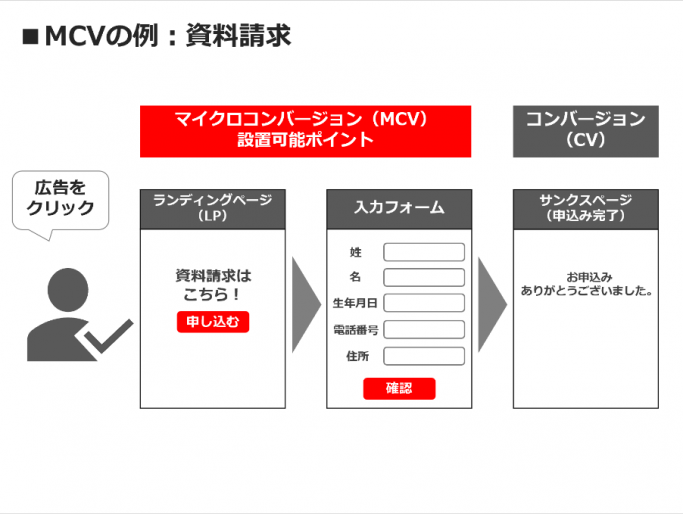
Microconversions are conversions that are set at intermediate points on the way to the final conversion, and are also known as “intermediate conversions.” First, let’s explain the details of microconversion.

Conversions set as intermediate points on the way to the final conversion
Micro-conversions are conversions that occur midway between a website user’s final conversion (purchasing a product, making an inquiry, registering, etc.).
Specifically, this includes the number of article views on the website, time spent on product pages, and items added to carts. These microconversions play an important role in tracking user behavior along the way to the final conversion.


Difference from conversion
The difference between microconversions and final conversions is that they have different objectives. The ultimate goal of conversion is to get the user to take an action, such as purchasing a product or making an inquiry, which is the purpose of the website. On the other hand, microconversions aim to track user actions along the way to the final conversion.
Microconversions are also an important element in determining your progress toward the final conversion. The higher the number of microconversions that precede the final number of conversions, the more users are accessing your website.

The importance of setting up microconversions
By setting up microconversions, you can understand user behavior during the process leading to the final conversion. For example, you can understand what product pages a user views and what products are added to their cart during the process from when a user accesses a product page to when they actually purchase the product.
Additionally, by setting up micro-conversions, you can figure out where to improve your website. If you have few microconversions, you may not have enough content or products to attract users’ attention.
Additionally, if the button to add an item to the cart is difficult to find, or if there is a problem, the user may leave the site before purchasing the item. By understanding these problems and improving them, you can create a website that encourages user action.
Additionally, microconversions are important for tracking your progress toward the final conversion. For example, if a user is viewing a product page but not adding an item to their cart, the content on that product page may not be engaging enough. By checking micro-conversions in this way, you can identify problems in the process leading to the final conversion and make improvements.
5 benefits of setting up microconversions
Setting up microconversions has many benefits in web marketing. Here are five benefits you can get by setting up microconversions.

Analyze user behavior numerically
By setting up microconversions, you can analyze user behavior numerically. For example, when a user visits a product page, you can collect information such as how far down the page they scroll and how much time they spend on that page.
You can also collect information on content pages, such as what kind of content is popular and how long people spend on it. By analyzing this information, you can find content and products that users are interested in, pages that may have problems, etc.

You can improve your website and content marketing.
By setting up microconversions, you can improve your website and content marketing. As mentioned above, you can analyze user behavior numerically, so you can find areas for improvement.
For example, by changing the location of the button that allows you to add items to the cart on a product page, you can improve the cart addition rate. Additionally, on content pages, by making popular content more prominent and improving problematic content, you can increase the length of stay and the number of page views.
Can be used for automatic bidding in advertising operations
By setting up microconversions, you can use them for automatic bidding in advertising operations. Automated bidding allows you to automatically adjust your ad bids based on how users interact with your website.
For example, if a user accesses a certain product page and it is determined that the user is likely to purchase that product, the bid price can be set to increase automatically.
Uses criteria other than conversion
By setting up microconversions, you can perform analysis based on metrics other than conversions. Examples include time spent on a website page, number of page views, and number of views of specific content. By analyzing these indicators, we can understand users’ interests and preferences, which can be used to improve our website.
In addition, microconversions can not only be simply analyzed numerically, but also provide detailed analysis of what types of users are taking what actions. For example, by setting the number of clicks on a product page as a microconversion, you can understand which users are interested in the product and which are not. Based on this information, you can create a marketing strategy for your target audience.
Promote machine learning in each medium
By setting up micro-conversions, you can promote machine learning for each medium. Machine learning is a technology that builds models based on large amounts of data and automatically displays optimal advertisements. Microconversions provide important data to improve the accuracy of the model.
For example, if the purchase of a certain product is considered a conversion, other user actions will not be evaluated at all. However, by setting up micro-conversions, you can evaluate what actions the user took even if they did not purchase the product. In this way, microconversions are positioned as important data for improving machine learning models.
3 disadvantages of setting up micro conversions
While there are many benefits to setting up microconversions, there are also drawbacks. Make sure to understand the disadvantages as well before using micro conversions.
More data to manage
By setting up microconversions, you can gain a detailed understanding of user behavior leading up to conversion. However, this increases the amount of data that must be managed, and it may take time to organize and analyze the data.
For example, on an
e-commerce
site, you can set up multiple microconversions such as users who add a product to their cart or users who visit a product page. However, since you need to manage data for each conversion individually, you will be dealing with a huge amount of data.
Target CPA amount needs to be reset
By setting up microconversions, you can understand user behavior leading up to conversion and optimize ad distribution. However, you need to be careful when setting the target CPA amount.
Normally, in advertising operations, you set a target CPA amount and decide on the advertising budget and distribution method to achieve it. However, when setting micro-conversions, it is necessary to reset the target CPA amount after taking into consideration the series of steps leading up to the conversion.
For example, on an e-commerce site, the subsequent conversion rate may be different depending on whether a user who visited a product page adds a product to their cart or a user who directly visited a product page and adds a product to their cart. . Therefore, you will need to reset your target CPA amount for each microconversion.
Consideration needs to be given to automatic bidding
By setting up microconversions, you can use them for automatic bidding. Automated bidding is a system that automatically changes bids to achieve goals set by advertisers.
However, if microconversions are set up incorrectly, they may not be taken into account when adjusting bids. Therefore, when setting up microconversions, you should carefully consider what kind of microconversions you want to set up before choosing a bid strategy.
In addition, when microconversions are set up, automatic bidding becomes more accurate and the optimal ad display is performed according to the advertiser’s goals. However, automated bidding may not work effectively if you don’t have the right microconversions in place.
Therefore, when setting up microconversions, advertisers should consider their compatibility with automated bidding and ensure that the appropriate data is collected to automatically adjust bids.

Points to set up micro conversions
When setting up microconversions, it’s important to keep the following points in mind:
Set metrics related to conversion
The most important thing when setting up microconversions is to be clear about how they relate to your original conversions. In other words, if a conversion is “purchase completed,” microconversions include actions such as “clicking the add to cart button,” “viewing the product detail page,” and “checking price information.”
These actions can lead to true conversions, so you can set them up as microconversions for data collection and improvement. However, it is necessary to not only collect the behavior, but also to take measures to improve it.
For example, if “clicking the add to cart button” is a microconversion, and if the number of microconversions is small, you can improve the button’s position, color, displayed product information, etc. to increase the number of users. You will be able to add items to your cart.
Settings according to the purpose of the website
When setting up microconversions, it is important to set them according to the purpose of your website. For example, for an e-commerce site, the most important conversion is “purchase completion”, and micro-conversions for this include “clicking the add to cart button” and “viewing the product detail page.”
On the other hand, if it is a blog site, there is no “purchase completion”, so the micro conversion settings will be different. For example, the number of article views, read rate, number of comments, etc. may be set as micro conversions.
Setting micro-conversions that match the purpose of your website not only helps you collect and improve data, but also helps clarify the direction of your website.
Tracking configured microconversions
After you set up your microconversions, you need to track their progress and make improvements. For this purpose, it is important to use the conversion tracking feature of Google Analytics.
With the conversion tracking feature, you can check the data of the micro conversions you set in real time. You can check the progress of your microconversions by logging into Google Analytics and going to Conversions > Goals.
Additionally, you can improve pages and content related to microconversions based on the microconversion values you set. For example, if a microconversion is “submitting an inquiry form,” you can increase the number of microconversions by improving the form’s layout and text.
By checking the progress of micro-conversions and making improvements, you can encourage user actions that lead to final conversions. To achieve this, regular checks and improvements are essential.
Set it near a layer with a certain number of volumes.
Micro conversion settings are for tracking specific actions within a website, and the disadvantage is that too many actions can make management complicated, and too few actions can reduce the accuracy of analysis.
In order to set the appropriate number of actions when setting up microconversions, it is important to set them near a level where a certain number of actions occur. This ensures that the number of actions occurring is just right, not too few, not too many.
For example, on e-commerce sites, microconversions are often set on product pages and cart pages. This is typically set on a product page by the number of views of product details or the number of items added to favorites, and on a cart page by the number of items added to the cart.
Additionally, on content sites, microconversions are often set on article pages and contact pages. This is typically set as “Number of Views” and “Number of Likes” for article pages, and “Number of Inquiries Sent” for contact pages.

How to set up microconversions
Microconversions are tools for tracking small actions taken by website visitors. For example, you can record actions that don’t directly lead to large conversions, such as adding an item to a cart or signing up for a newsletter subscription form. This allows us to better understand visitor behavior on your website and help you improve your marketing strategy.
Here, we will explain how to set up micro conversions using Google Ads as an example.
Set conversion action categories
First, set the microconversion category. This category is related to specific actions on your website.
For example, a category for microconversions related to purchasing a product is “pre-purchase actions,” a category related to subscribing to a newsletter is “registration actions,” and so on.
Give your conversions an easy-to-manage name
When setting up a microconversion, you need to set a name for it. This name will be useful when checking the report later, so make sure it is clear and concise.
For example, if the conversion you want to achieve is “purchase completed,” a microconversion might be “clicking the add to cart button.” In this case, you might want to name your microconversion “Add to Cart” for clarity.
Set the count to “first time only”
Microconversions can be made multiple times by the same person, so if a single user makes multiple microconversions, they may be counted multiple times. However, it is rare for one person to do this multiple times, so by setting the count to “first time only”, you can ensure that one user is only counted once.
This setting prevents the number of microconversions from becoming too high and allows you to obtain more accurate data.
Check to include in conversion column
To track microconversions, you must enable the Include in Conversions column option. This will ensure that microconversion data is included in your conversion reports.
Attribution model uses attenuation
Attribution models are a way to track users’ journey to conversion using multiple marketing channels. Google Analytics offers a variety of attribution models, including the last click model, linear model, time decay model, and point decay model.
A decay model is a way to attribute attribution based on a user’s engagement across multiple channels, rather than attribution to the last click. Time decay models consider how much past actions influenced current conversions, starting from the last action. We assume that the first action has the most impact on conversion, and that impact decreases over time.
By adopting such an attenuation model, it is possible to accurately evaluate the influence of microconversions. For example, if a user visits a product page, adds an item to their cart, and then returns from another marketing channel to complete a purchase, the last-click model gives them credit for completing the purchase.
However, using a time decay model, you can see that microconversions have real impact, as add-to-cart microconversions are also given credit.

summary
In this article, we have explained the overview of micro conversions and how to set them up. Microconversions are metrics that track user behavior and intent and visualize the process leading to conversion. Microconversions play an important role in understanding the steps leading to the final conversion and identifying areas for improvement at each step.
On top of that, you need to pay attention to the following points when setting up micro conversions.
Microconversions are an essential indicator for website improvement. By understanding how to set them up and using them correctly, you can understand user behavior and intentions, leading to improved conversion rates and site improvements. Masu. Please refer to this article and review your site’s microconversion settings.