
Recently, it has become mainstream to build websites using CMS such as WordPress. However, if you have never used a CMS, there are many things you may not know, such as how it differs from a traditional website or how its operation will change.
In this article, we will explain the benefits of building a website using a CMS and the key points for operation after building it.
What is CMS?
CMS

is an abbreviation for “Contents Management System”. It is a system for efficiently creating, updating, and managing website text, images, etc., and is characterized by the ability to centrally manage content within a CMS.
Traditional websites are written using markup languages such as `
`HTML
” and “
CSS
” to create HTML and CSS files, which are then uploaded using FTP software to build a website.
However, even if you outsource the creation of your website to a web production company, there is no one within your company who can create an HTML file from scratch, and you may not be able to update what is created for you. This is a common occurrence. Even in such cases, with a CMS, even if you have no knowledge of HTML or CSS, you can perform minimal updates and operations with simple operations.
Well-known CMS include
WordPress
and Movable Type. It used to be thought of as a blog update tool, but now many companies are also using it to operate their official websites, service sites, owned media, etc. CMS is now a method that is often used by companies to build full-scale websites.
Need for CMS
By the way, why do you need a CMS? Also, why is CMS used so much? The reason for this is probably the convenience of not having to create HTML and CSS files from scratch, making it easy to update, and being able to update directly from the web.
Recently, work style reform and digital transformation have been promoted, and after the spread of the new coronavirus infection, face-to-face sales and communication have decreased due to refraining from going out, and telework has been promoted, and the use of digital and web has become more common. This may be due to the fact that it has become a popular topic.
For example, if a business that used to sell products in a physical store is involved in e-commerce or digital marketing, it is common for them to have no knowledge of HTML, CSS, etc. Even if you are such a person, if you have the minimum knowledge of PC operation and website usage, it will be easier to manage the website in the sense that you can update the website. CMS also makes it easier to outsource website operations.
However, depending on the CMS, it may be better to have knowledge of HTML and CSS when updating or adding functionality. Nowadays, it is only by adding functionality as plugins that you can create a website that is on par with your competitors. CMS is becoming more than just a tool that can be easily updated without any knowledge of HTML or CSS.
Advantages of building a site with CMS
Now, let’s learn more specifically about the benefits of building a website with a CMS.
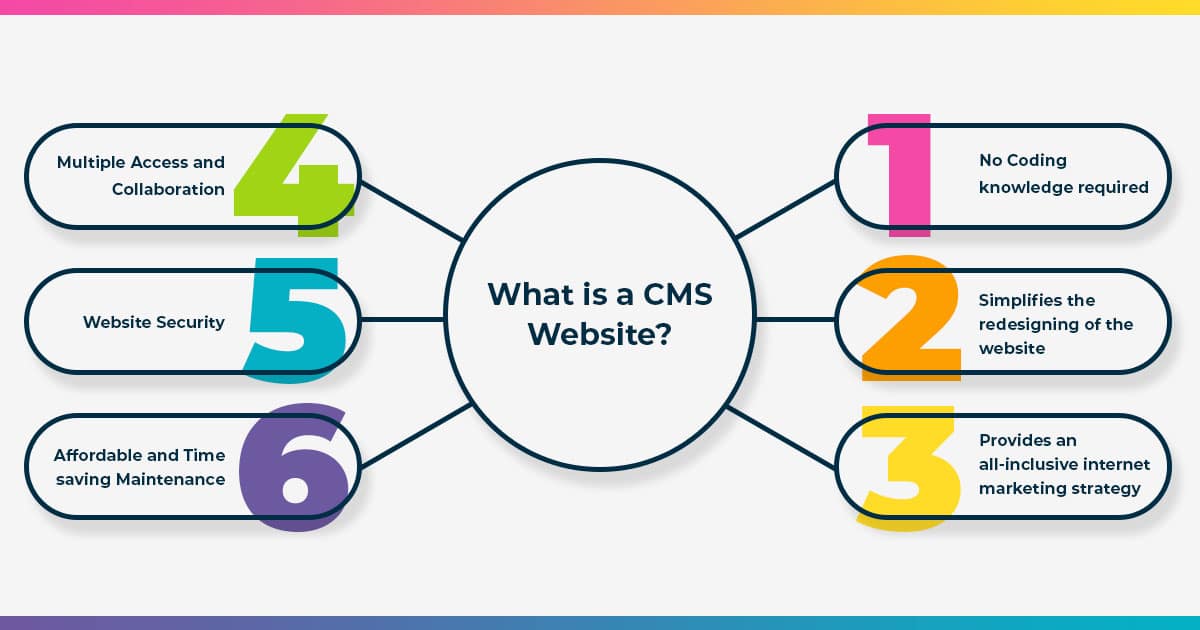
1. Easy to create and update pages and content
<br/> The updating process, which used to involve creating files using languages such as HTML and CSS and uploading them to a web server, becomes much easier with a CMS. Being able to access a website and update it on your browser is convenient even if you have no knowledge of HTML/CSS. This saves time and improves work efficiency.
Additionally, since the work becomes easier, the range of personnel to whom update work can be entrusted will be expanded. There is no longer a need to outsource or self-study website production and management. In other words, since updating tasks can be simplified, it will be easier to concentrate on other core tasks, such as content planning and data analysis.
2. Can be centrally managed
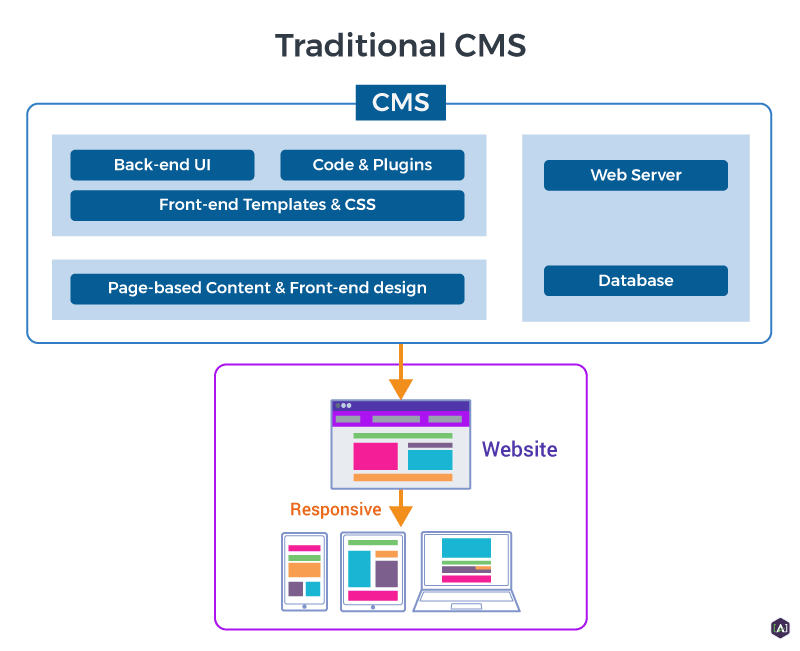
Using a CMS, you can centrally manage all of your website’s content, including text, images, pages, designs, and templates. A CMS automatically generates each website page by extracting all information such as text and images from the database as needed. Centralized management means that it is easier to update and manage.
3. Web production can be divided
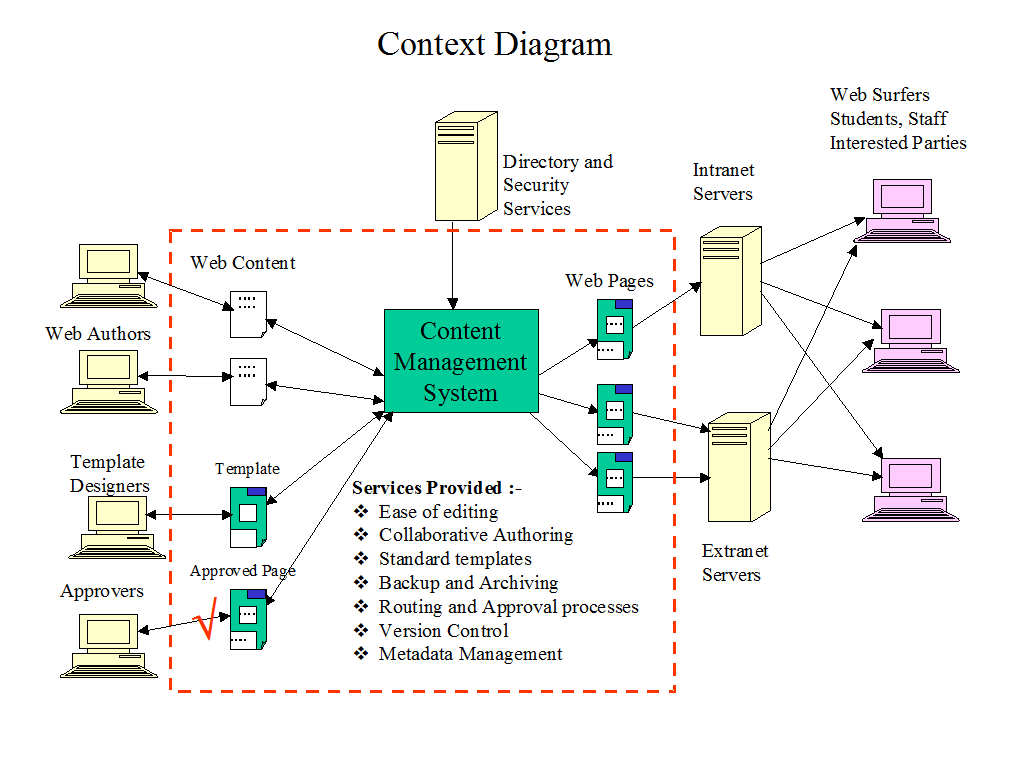
By using a CMS, you can separate tasks such as design creation, content creation, and update work. For example, a designer comes up with the design and creates the images, a writer creates the text for the content, and an operator handles the work of reflecting the finished images and text on the web page and updating it, making it easier to divide labor. .
Traditionally, when creating web pages for a website, a person in the position of web designer was responsible for all design, content, and updating. However, since CMS allows division of labor, the quality of each content such as design, images, and text will improve, and if there is someone dedicated to updating, updates will be done quickly.
In addition, there are cases where different departments are responsible for different websites. In such cases, the person in charge of each department can update their own page.
4. Benefit from using templates
When building a website using CMS, you can easily incorporate the base of the website using templates. In other words, you don’t have to make it yourself from scratch, and you can complete it by modifying the design and structure to a certain extent to your own specifications.
There are still many benefits to using templates. Templates can create a sense of unity throughout your website. Another advantage is that when changing the design, you only need to reselect the template, or you can change the design with just a few changes.
5. You can create a website that is SEO friendly
Some CMSs allow you to easily create
SEO
(search engine optimized) web pages. From the beginning, we have a system in place that allows you to structure your pages so that they appear at the top of search engines.
Furthermore, if you add functionality with a plugin that supports SEO measures, it will be easier to implement SEO measures. As a result, SEO can be much easier than building a website from scratch without using a CMS. However, this varies depending on the CMS, so be sure to check the extent to which SEO measures are possible when choosing a CMS.
6. You can add various functions to your website by using plug-ins.
Depending on the CMS, there are many plug-ins developed by general programmers. You can easily add and expand a variety of functions to your website by selecting the plugin with the functionality you want to introduce to your website from among these various plugins, and installing it in your CMS. For example, there are plugins that support SEO measures and plugins that allow you to add content that can be shared on Twitter and Facebook with a single button.
7. Leads to reduced operational costs
CMS has the potential to reduce overall website operation costs. In the past, it was common practice to have a web production company create and build a website, and then request the same web production company every time there was an update. However, it had the disadvantage of being expensive to operate.
With a CMS, you can have a web production company create and build your website, and then update it in-house. This will lead to a reduction in outsourcing costs. In addition, some organizations went out of their way to hire people with knowledge and skills in web production and have them perform the update work, even if they did not outsource. CMS can also reduce human resources costs.
8. Easy to create sites for smartphones
Depending on the CMS, you can automatically or easily create a site for smartphones as well as a site for PC. If you use such a CMS, you can easily support the smartphones that are required in recent years.
There are various ways to create a website, but you may choose to build a website using a CMS because it is easily compatible with smartphones. In the past, it was sometimes necessary to create a site for smartphones from scratch after creating a site for PC, but some CMSs can automatically create sites for smartphones at the same time, which greatly reduces the effort. Reduce.
As you can see, there are many benefits to building a website with a CMS. However, please keep in mind that these benefits can only be enjoyed when you choose a CMS that suits your company. CMS is not a panacea.
Three types of CMS that allow you to build websites
By the way, there are three types of CMS that can be used to build websites: Please use this information when selecting a CMS.
1.Open source CMS
For some CMS, the source code of the CMS program is publicly available. For example, WordPress is an open source CMS. Open source is something that anyone can freely use, modify, and distribute, and ordinary programmers can modify it and develop templates and plug-ins. Therefore, open source CMS is characterized by high extensibility.
In addition, in many cases, this open source CMS is available for free, so companies can reduce initial implementation costs. Of course, implementation requires a certain amount of specialized knowledge, so the cost cannot be said to be zero, but the advantage is that the cost of the CMS itself is unnecessary.
For this reason, it is suitable when you want to keep costs as low as possible, but still want a certain degree of scalability and freedom.
However, while it offers a high degree of freedom, it is necessary to install and install the CMS itself and prepare the server, and in the event of a problem, support is often not available from the provider. Possible options include hiring a company that provides support for implementing the CMS, or hiring someone with specialized knowledge. In any case, be sure to anticipate any problems and prepare countermeasures.
WordPress is currently said to have the top market share as an open source CMS, and is used by a wide range of people around the world, from large companies to sole proprietors and individuals. It has many templates and plugins and is highly customizable. Because of this, you have a high degree of freedom, so if you want to customize WordPress, it would be a good idea to hire someone who is good at it or outsource it to a specialist company.
It is also said to be strong in SEO, so it is considered suitable for companies that place emphasis on SEO measures. It’s free to install, so there are no contract costs. Installation requires some specialized knowledge, so be prepared for that.
Once installed, even people with little knowledge of HTML can easily update and operate the service once they have learned how to use it.
(2) Drupal
http://drupal.jp/

Drupal is an open source CMS that is used worldwide, and is widely used by large-scale sites such as large companies, government agencies, and universities, as well as small-scale sites. It is said to have enhanced security, so it can be said to be the best open source CMS for businesses. It is also suitable if you want to operate a website with a large number of pages.
In addition to being used as a CMS, Drupal also functions as a web application framework that can be used to build membership websites, SNS, internal intrasystems, etc. It is more versatile than a general CMS, so if you use it properly, it will be a plus for building your company’s website.
2. Cloud-based CMS
A cloud-based CMS is a CMS that allows you to build a website on a cloud server on the Internet. For example, famous services such as Jimdo and Wix fall under this category. Since these services can be started for free, initial installation costs and operational costs can be reduced. Also, since it is designed for relatively beginners, it has the advantage of being easy to operate. However, it is often inferior to open source types in terms of customizability, so it is suitable when you want to create a minimal website with low initial costs.
In addition, many free cloud-based CMS have paid plans, and it is possible to expand the range of possibilities by paying a fee. There are also many paid versions. In any case, if it is a paid service, you are more likely to receive support from the CMS operator. It is an advantage to be able to contact us as soon as you have any questions.
Wix is a CMS that was started in Israel in 2006, and it appeared as a tool that allows anyone to easily create a homepage for free, even if they have no programming knowledge. In 2019, a Japanese corporation was established in Tokyo. Since the service is also provided in Japanese, Japanese companies can also use it freely.
In addition to being able to intuitively build a website with simple drag-and-drop operations using the mouse, it also comes with many beautiful and well-designed templates, making it ideal for corporate websites. Available from free version to paid version. The free version is not suitable for a full-fledged corporate website as it does not have a lot of flexibility. Also, in terms of customizability, it is a little inferior to other CMS, so you should think carefully before introducing it.
(2) EC-CUBE
https://www.ec-cube.net/

EC-CUBE is a CMS specializing in EC sites, available in open source and cloud types. In addition to functions such as a shopping cart that are necessary for an e-commerce site, the free version is also equipped with useful functions such as regular purchases and point accrual functions, so it is widely used. It is also highly customizable, so it is recommended if you want to create an e-commerce site. The open source version is distributed free of charge, so if you have the knowledge, you can install it while keeping the initial cost low. If it is cloud-based, security is safe, so it may be a good idea for your company to use it, although it does cost a fee.
In addition, there is a system called EC-CUBE Integrate Partner, which lists companies that are cooperating with the development of EC-CUBE, and you can request them to build and design your EC site. If building an e-commerce site is difficult on your own and you are thinking of outsourcing it, you may want to try finding one of these partner companies.
3. Packaged CMS
A packaged CMS is a type of CMS in which you purchase software and licenses and install them on your PC. There are many cases in which the service is targeted at companies, and one of its features is that it is originally designed to enable the construction of corporate websites.
In addition, we will prepare our own server and upload to it. In many cases, they have strong security features such as authentication, so companies can use them with confidence. Recommended if you want to build a solid website for your company even if you spend a certain amount of money. Another advantage is that they often have a strong support system.
(1) Movable Type
https://www.sixapart.jp/movabletype/

Movable Type is a CMS made in Japan, but it is a famous CMS used all over the world. The paid version offers both a package type and a cloud type, and there are various plans available, so you can support a variety of websites from large to small that are optimal for your company.
Movable Type has a mechanism that generates content statically rather than dynamically like WordPress, so it has the characteristics of being displayed faster and having a lighter load than a dynamic CMS. However, some say that large-scale sites are a little slow to display, so we cannot say that it is suitable for large-scale site management, but if the number of pages or content is not very large, it is possible to display quickly. Since it can be expected, it is suitable for corporate sites.
(2) HeartCore
https://www.heartcore.co.jp/
HeartCore is a packaged CMS suitable for companies that want to focus on digital marketing as well as website construction. It has many functions necessary for digital marketing. For example, CMS functions include not only content creation and editing functions, but also SNS linkage, customer management, automatic SEO functions, etc.
It also has AB testing, segmentation, heatmap functions, and marketing automation functions. The idea is that it is a CMS that can be used by both web creators and marketers for different purposes. It also has the ability to link with core systems and member management systems, making it useful for corporate marketing activities.

Points of CMS operation
So, when you build a website using a CMS and try to update it, you may not be able to imagine how to operate it. Therefore, we will explain the key points of CMS operation. Of course, this varies from case to case, so please take this as a general rule.
The reason why it is especially recommended for CMS is that it is difficult to individualize the operation. CMS is often so simple that anyone can operate it, so if you create operational rules and manuals from an early stage and make it possible to perform routine tasks, you can easily handle the tasks. This will lead to increased operational efficiency, and in the unlikely event that there is a shortage of manpower, you can easily outsource.
For example, in the case of WordPress, there are a lot of templates, but one way is to choose a convenient one whose design can be easily changed or can be changed simply by replacing the template. Templates use not only HTML and CSS, but also design templates written in the language PHP, so there are situations where knowledge of PHP is required to change templates. If you are particular about design, you may consider hiring someone who is good at customizing WordPress designs.
Also, while it is common to have a feature that allows you to add comments to blog posts, the comments section is often flooded with spam. Therefore, it is essential to take measures against spam in advance. Assuming such risks, be sure to take countermeasures from the beginning, and always keep such security risks in mind during operation.

summary
◆CMS is an abbreviation for “Contents Management System.” It is a system that allows you to efficiently create, update, and manage website content, and its feature is that you can centrally manage content within the CMS. It is divided into three types: open source type, cloud type, and package type.
◆The advantages of building a site with CMS are that it is easy to create and update pages and content, it can be centrally managed, web production can be divided, you can get the benefits of using templates, you can create a website that is SEO friendly, and plugins. By using In, you can add a variety of functions to your website, reduce operating costs, and easily create websites for smartphones.
◆Key points for CMS operation include formulating operational rules and manuals, initial construction assuming customization of design and configuration, ensuring measures against spam and hacking, regular version updates, and public reservation function. This includes making use of , making use of workflow functions, and making use of marketing functions.