

If you are running a site that uses SEO, you will determine search terms by looking at the monthly search volume of keywords, searching for related keywords, etc., and then creating content. The Keyword Planner can be used for this purpose.
In this article, we will introduce the overview of Keyword Planner, how to register it, how to use it, and how to make the most of the information. Please use this as a reference to make your SEO efforts successful.
Google Keyword Planner Overview
Google Keyword Planner is one of the keyword tools used when implementing
SEO
measures. The main uses are as follows.
By using Google Keyword Planner, you can research frequently searched keywords and competitor sites, giving you useful information for your SEO efforts.

Is Keyword Planner free?
In conclusion, Google Keyword Planner can be used for free by those who are thinking of distributing ads using Google Ads and those who are currently distributing advertisements using Google Ads. Of course, you can use Keyword Planner even if you are not using Google Ads, but the system is such that you cannot obtain detailed information for each keyword unless you pay a certain amount of advertising costs.
Additionally, as of July 2020, there was information that detailed data could not be seen even after paying an advertising fee of approximately 1,000 yen. Although the advertising costs required are not clear, it is clear that a certain amount of money is required. If you don’t want to pay for advertising, you may want to use other tools.

Discover new keywords
Google Keyword Planner helps you discover new keywords. You can check the new keyword information you are looking for and the search volume for each new keyword, which will expand the scope of your content creation. Also, if you are struggling with SEO or want to expand the range of users visiting your site, discovering new keywords can be a solution.

You can discover related keywords
You can also find related keywords in Google Keyword Planner. It will be displayed at the same time as new keyword searches, and by implementing SEO measures that include related keywords, you will be able to tell search engines that your content has been comprehensively prepared. Additionally, in order to create content that will make users feel glad they visited, it is extremely important to discover related keywords to satisfy search intent.
At the same time, you can easily understand detailed information such as search volume and bid price for related keywords. Information associated with keywords can also be obtained, which can be used to select keywords for SEO measures.

How to register for Keyword Planner
So far, we have provided an overview of Google Keyword Planner. Next, we will explain how to register for Keyword Planner in the following order.
1. Create a Google account
2. Post an ad
3. Change to expert mode
Let’s look at them one by one.

Create a Google account/Google Ads account
To use Google Keyword Planner, you will need to create a Google Account for Keyword Planner. You will need to log in to Google Ads from the Keyword Planner display screen, so be sure to remember your Google account email address and password.
After creating a Google account, access
the Google Ads website
.
From “Start Now”, follow the information displayed on the screen to register your information and create a Google Ads account.
Place an ad
There are several steps you must follow to place an ad. The order is as follows.
1. Set advertising goals. You need to choose according to your purpose, but select “Increase product purchases and applications on the website”
2. Enter your site name and website URL on the business description page
3. Set the location of your site’s target audience
4. Keyword theme settings
5. Proceed to create the ad and enter the headline and site description.
6. Set a budget. When distributing ads, set the amount as low as possible because the set amount is used to use Keyword Planner.
7. A confirmation page for campaign settings will appear, but no input is required.
8. Set up payment information
9. Once all settings are completed without any problems, you can start posting ads.
In order to place an ad, you need to go through many steps and the settings are difficult, but once you set them up, you can use them over and over again.

Change to expert mode
After posting an ad, Google Keyword Planner is set to the simplified version of Smart mode. In that case, you will no longer be able to use Keyword Planner and will need to switch to Expert mode.
Expert mode can be changed by clicking the settings icon in the top right corner and selecting “Change to expert mode” from the menu.

How to use Keyword Planner
So far, we have explained how to register for Keyword Planner. Next, we will introduce how to use the keyword planner efficiently in the following five ways.
By knowing these things, you can use Keyword Planner efficiently. Let’s look at them one by one.
Discovering new keywords
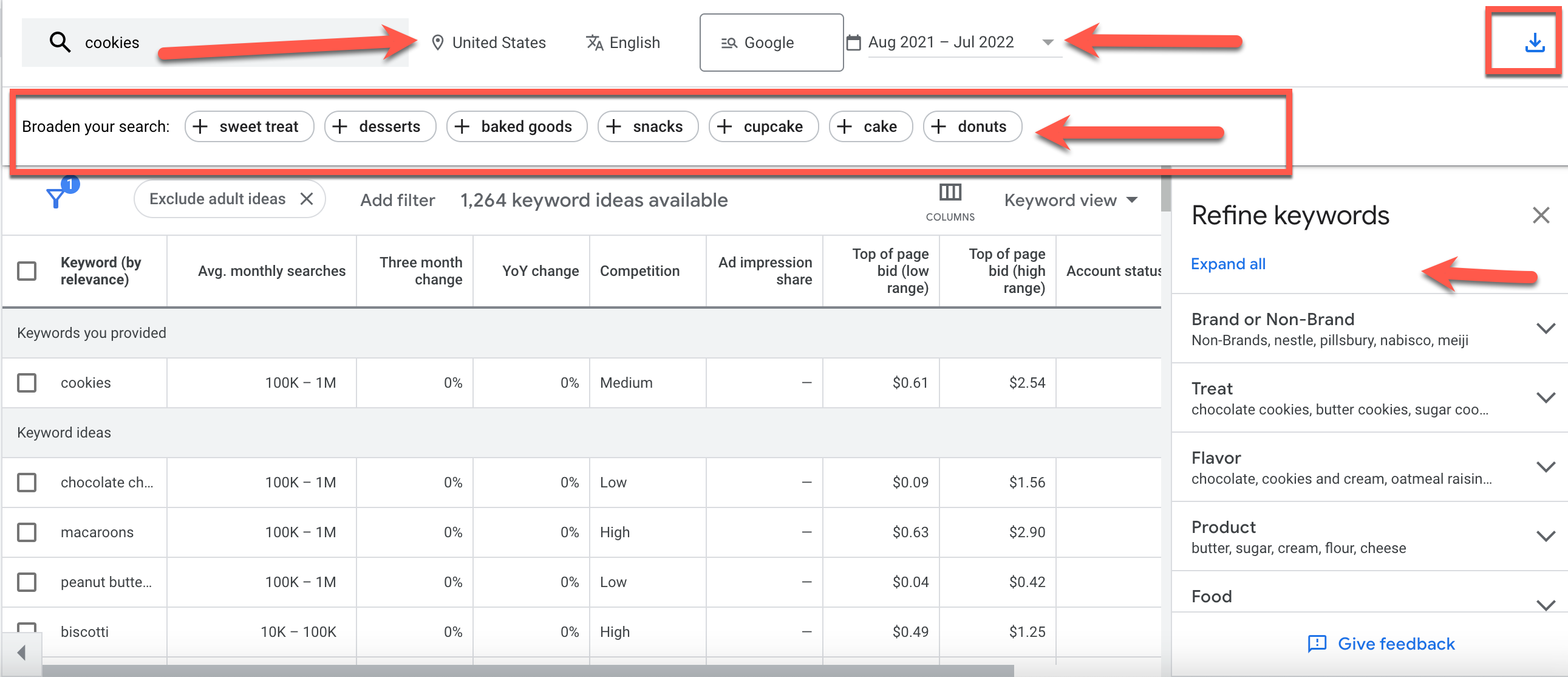
The first way to utilize it is to discover new keywords. You can check keyword information in detail by using the discovery of new keywords.
The method for discovering new keywords is as follows.
By using the discovery of new keywords, you can also research related keywords. Efficiently utilize the discovery of new keywords and expand the range of keywords for your SEO efforts.
Start with the website
The second way to utilize it is to start from a website. Keyword Planner allows you to use websites to research keywords and allows you to research other competitors’ sites. To use the website, click Discover new keywords and select Start from website. After that, you can research other competitors’ sites by choosing whether to specify the entire URL site or only the page with the specified URL. Use Start From Website to differentiate your site from your competitors.
Start with keywords
The third way to use it is to start with keywords. Start with keyword allows you to enter up to 10 keywords, allowing for efficient keyword searches. Also, if you want to block irrelevant keywords, you can add domains as a filter to narrow down your search to only keywords related to the content published on your site.
By using Start with Keywords efficiently, you will be able to obtain only the keyword information that you want to know.
How to read the results of new keyword discovery
The fourth way to utilize it is to view the results of discovering new keywords. By discovering the new keywords introduced in the first step, you can see detailed keyword data. You can set the items you want to know from the display items, so you can check only the information you want to know. However, please note that index values, organic search impression share, and average search ranking cannot be set from the items. If you want to know detailed information about new keywords, please use the display items.
Check search volume
The last way to utilize it is to check the search volume. With Keyword Planner, you can check the search volume, which is essential information for SEO measures. The method to check the search volume is as follows.
By examining search volume, you can obtain various benefits such as determining the content and direction of the site. Check your search volume and create an SEO-friendly site.

How to utilize the information in Keyword Planner
So far, we have introduced how to use Keyword Planner. When using a keyword planner, it is important to know not only how to use it, but also how to utilize the information. This is because by knowing how to utilize information, you can find a way to use it according to your purpose. Here’s how to make use of the information in Keyword Planner.
Let’s look at them one by one.
Discover new keywords for SEO content
By discovering new keywords for SEO content, you can improve the quality of your content and SEO ranking. When discovering new keywords, the important thing is to research keywords while developing a strategy.
The trick to finding keywords for SEO content is to choose keywords that match the size and genre of your site. Keywords are divided into “small keywords” with a search volume of 100 to 1,000 or less, “middle keywords” with a search volume of 1,000 to 10,000 or less, and “big keywords” with a search volume of 10,000 or more. By using different types of keywords depending on your site, you will be able to efficiently produce results with SEO.
Examining the level of competition
Keyword Planner allows you to research the competition level. For the research method, select Start from website by discovering new keywords, and paste the URL of your competitor’s site. By doing so, you can research the keywords that your competitors are targeting.
In addition, the filter function allows you to narrow down your keywords, allowing you to efficiently investigate the competition level. Research the competition level and create SEO content in areas where your own site can win.
Delivery simulation
Keyword Planner allows you to simulate distribution. Distribution simulation is useful if you have no knowledge about Google Ads or if you have difficulty visualizing SEO. To run a distribution simulation, all you have to do is find a new keyword and paste the URL of the site you are considering advertising on.
By checking the keywords in the search results, you can easily simulate how to expand the keywords. It is also useful to research other companies’ competing sites that may be related to your site, so we recommend using distribution simulation to ensure smooth site operations.

Summary: Use Keyword Planner effectively
In this article, we have introduced the overview of Keyword Planner, how to register it, how to use it, and how to make the most of the information. A keyword planner is one of the tools you will need if your site uses SEO. To make your SEO efforts successful, start using Keyword Planner today, which allows you to analyze your site’s keywords and competitors.