

Webp is a next-generation image format developed by Google in 2010.
Webp is known for its light image size, and it is recommended to use it from an SEO perspective when creating homepages and websites. However, there may be many people who do not understand the specific outline of Webp.
In this article, we will provide an overview of Webp and explain its differences from other image formats such as JPEG and PNG. We will also explain the advantages and disadvantages of using Webp, and how to actually use it, so please refer to it.
What is Webp?
First, I will explain the overview of Webp. Webp is a next-generation image format developed by Google and officially announced in 2010.
Webp has a high image compression rate and is advantageous in increasing display speed. At first glance, Webp seems to have only advantages, but in the past, there was a concern that only a few browsers supported it. However, as of June 2022, major browsers such as Google Chrome, Safari, and Firefox are compatible with Webp.
We recommend that those in charge of homepage production, website production, SEO, etc. use Webp as much as possible and strive to improve display speed. In order to measure the display speed, it is best to use “PageSpeed Insights” provided by Google to evaluate the current situation.
The need for image compression
There are several reasons to compress images. Especially online, websites that are heavy on images and use a lot of data are not a good thing. This often leads to negative factors from an SEO and usability perspective.
The main reasons for compressing images are as follows.
To reduce bounce rate
Google has released data that shows that when users visit a web page and the content is slow to display, the bounce rate increases.

Source:
Think with Google – Find Out How You Stack Up to New Industry Benchmarks for Mobile Page Speed
- Bounce rate increased by 32% from 1 second to 3 seconds
- 90% increase in bounce rate from 1 second to 5 seconds
- Bounce rate increased by 106% from 1 second to 6 seconds
- Bounce rate increased by 123% from 1 second to 10 seconds
You can see that the bounce rate varies greatly depending on the page load time. In this way, in order to prevent the bounce rate from increasing, it is necessary to compress images to make the web page lighter and increase the loading speed.
Because it is essential for SEO measures
From a usability perspective, Google says that the display speed of a web page also affects the ranking of search results. In other words, a site with heavy images and slow web page display speed may have a negative
SEO
rating.
Google officially announces in its “Basics of Google Search” that content, including images, is an important element for appearing at the top of search results.
Source:
Google Search Basics
In other words, image capacity is one of the important factors for satisfying what Google calls “eligibility necessary for displaying at the top of search results”.
To reduce the load on the server
When
a server
is overloaded, it not only causes inconvenience to the company providing the server, but also the users may suffer financial losses.
For example, if the server is overloaded, it will lead to the server going down, but before that happens, a 503 error (Service Unavailable) will appear and preventive measures will be taken. When a 503 error occurs, you will be unable to view the website, resulting in lost opportunities such as not being able to purchase products or services. Also, if 503 errors occur frequently, users may leave your site.
For these reasons, in order to reduce the load on the server, it is necessary to reduce the data volume by compressing images as much as possible.
To reduce user stress
Although it is not a factor that directly leads to SEO search results, improving “usability” can also reduce user stress.
A website that makes users feel stressed = a website with poor usability is a website that makes users uncomfortable. In such cases, the time spent on the website may become shorter and the exit rate may increase, which may indirectly reduce your SEO rating.
In order to reduce user stress from a usability perspective, compress images and other content as much as possible to ensure smooth display.

Features of Webp
The main features of Webp include the following:
No need to use different formats
When using Webp, there is no need to use different formats.
For example, you don’t have to use “gif” because you want to animate the image, or “png” because you want the background to be transparent, and you can unify Webp to some extent on one website.
High image compression rate
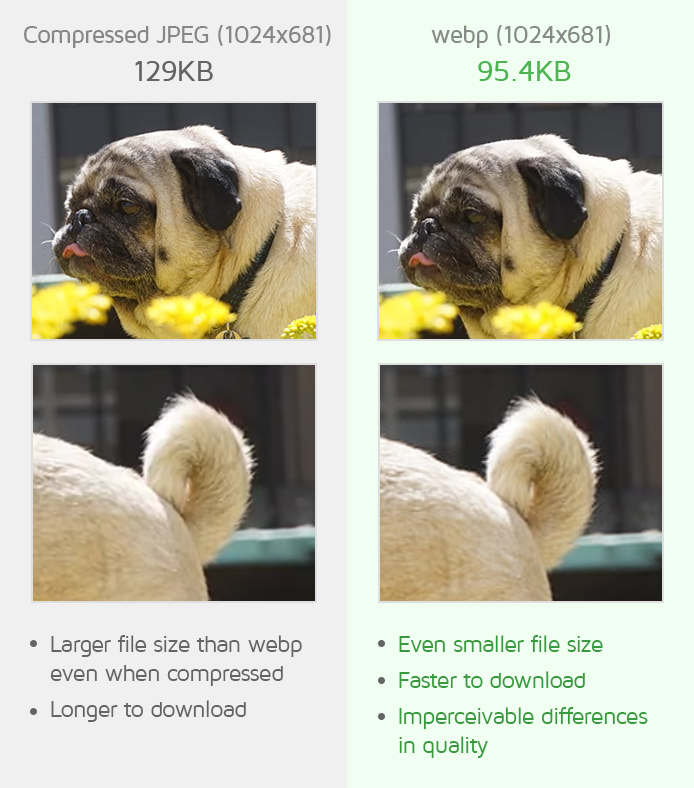
Although Webp has a higher compression rate than “jpg”, there is almost no deterioration in image quality and only the capacity can be reduced.
Normally, if you increase the compression rate and reduce the file size, the image quality will deteriorate in proportion to the compression rate. However, with Webp, you can reduce the size while maintaining the original image quality as much as possible.
Supports both reversible and irreversible compression storage formats
Webp supports both reversible compression, which preserves the original data without losing it, and irreversible compression, which preserves the image quality of the original image as much as possible while reducing capacity at the cost of losing data. .
Although it has similar functionality to other formats, it has the advantage of being more lightweight than those formats.
Background transparency and animation creation possible even with irreversible compression
Webp can handle alpha channels even in lossy compression. The alpha channel is a data area that can handle transparency information, and this work area makes it possible to make the background transparent.
In other words, transparent images saved in “gif” and “png” formats can also be exported with Webp. This makes it possible to compensate for the shortcomings of “jpg”.
Differences between Webp and other image formats
So far, we have provided an overview of Webp. By the way, many people may not know the difference between Webp and other image formats. From here, I will explain the differences between the following three image formats and Webp.

Difference with JPEG
JPEG is an abbreviation for Joint Photographic Experts Group.
Although it is similar to Webp in that it requires less data, the difference is that it can express more colors than Webp. Therefore, JPEG is commonly used as an extension when saving photos.
However, JPEG cannot perform transparency processing on part of the image, which is done in Webp. This is because JPEG itself does not have transparency processing. Therefore, it is not recommended to use JPEG in situations where many photos are used, such as creating homepages or websites.
On the other hand, JPEG can be said to be useful when posting or saving a single photo on SNS.
Difference with PNG
PNG is an abbreviation for Portable Network Graphics.
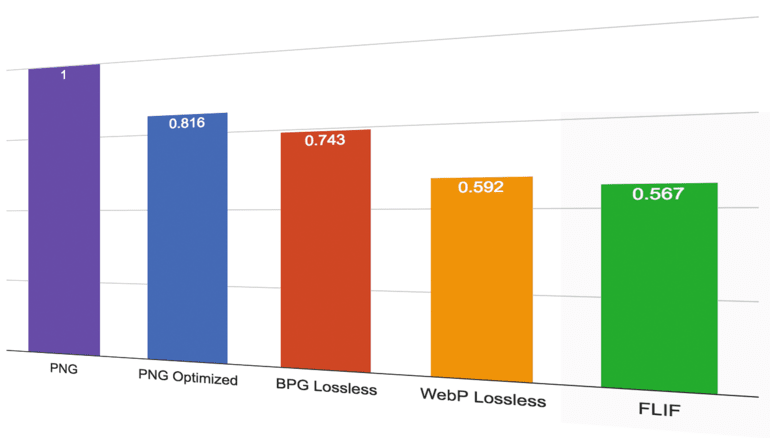
The biggest difference from Webp is the large data capacity. However, unlike Webp and JPEG, it is possible to make parts of the image transparent.
In addition, the number of colors that can be expressed is large, and the image quality will not deteriorate no matter how many times you save it. However, PNG does not support animation.
If the amount of image data can be compressed more than JPEG, it may be used for homepages and websites.
Difference from GIF
GIF is an abbreviation for Graphics Interchange Format.
The biggest difference from Webp is that it is often used for animation. However, GIF only supports up to 256 colors, so the number of colors that can be expressed is smaller compared to other extensions. Also, please note that the image quality tends to be rough.
If you want to use an animated image, there is no problem as long as you basically use GIF.
Advantages of Webp
So far, we have explained the overview of Webp and its differences from other extensions. From here, I will explain the following three advantages of using Webp.
Reducing image size
Webp allows you to reduce the file size of images. At the same time, even if you reduce the weight or compress the image, the image quality will not be that bad, so you don’t have to worry about damaging the design of the image itself. Comparing Webp and JPEG, it is possible to reduce the image size by at least 25%.
Improving page speed
You can also improve your website’s page speed by reducing the file size of your images with Webp. Page speed is the speed from when you click until the page is displayed.
The faster the page speed, the better the usability, which is a huge benefit from a UX perspective. As a result, the CV rate, an indicator directly linked to sales, will also increase.
Benefits in SEO
Faster page speeds with Webp also have benefits for SEO.
Google uses page speed as one of the evaluation indicators for websites, and slow websites tend to have lower search rankings.
If you want to improve your page speed, we recommend using Webp, as a fast website is more likely to receive a good rating.

Disadvantages of Webp
Earlier, I explained the advantages of Webp. On the other hand, Webp is not without its disadvantages. Here, we will explain the following three disadvantages of Webp.
There is no usage judgment from JavaScript
For web applications created using JavaScript, the Webp usage judgment may not be displayed. Although there are differences depending on the browser, which will be explained later, using Webp is a disadvantage for applications that rely primarily on JavaScript.
As a solution, it is possible to determine the use by directly embedding Webp in the image tag, but this is not recommended as it requires a lot of development time.
Some browsers are not compatible
Since its announcement in 2010, the number of browsers that are compatible with Webp has gradually increased, but there are cases where older browsers are not compatible. However, it is compatible with all major browsers, and it is rare to develop for older browsers, so there is basically no problem using Webp.
I need to convert the image
To convert images saved in conventional formats such as “gif”, “png”, and “jpg” to Webp format, you need to use a tool to convert them.
In addition, the supported formats may be different, so if you want to convert an unsupported format, you will need to find a different tool. When converting to Webp, you may need multiple tools to convert just one image.

How to convert webp
Use Photoshop
By installing “WebPShop”,
a plug-in
for Photoshop, you can convert extensions such as PNG and JPEG to Webp. However, it is important to note that Photoshop alone cannot load Webp as is.
By installing WebPShop, you can open, edit, and save Webp on Photoshop.
Use WordPress plugins
WordPress also has a plugin that automatically converts to Webp. For example, “WebP Converter for Media”.
This is an extremely excellent plug-in that automatically determines whether the browser supports Webp, and if it can be used, it will display it in Webp, and if it cannot, it will display it in JPEG, PNG, etc. The appeal of this system is that it automatically makes the determination, reducing the operator’s workload.
In addition, images that have already been uploaded to WordPress can be converted to Webp all at once. Furthermore, since images converted to Webp are saved in a separate directory, they will not interfere with existing images.
If you run your website with WordPress, install and activate WebP Converter for Media.
Use a conversion site
To easily convert images to Webp format, we recommend using a conversion site. There is no need to install any tools, and there is no need to perform difficult command line operations.
Simply drag and drop files onto your website to import them, and press the convert button to convert them. Recommended if you want to try out the conversion first before making a full-scale implementation.

Services that can be converted to Webp
We will introduce the following services that can convert images to Webp.
Squoosh
Squoosh is an image compression tool developed by Google. Not only can you convert to Webp, you can also convert to various formats and change the size.
It is a very easy to use tool as both the before and after conversion images are displayed on the browser and you can adjust the images while comparing them.
Salwaka tool box
Sarwaka Toolbox is a tool collection site that provides various tools that can be used on the browser for free.
Unlike the Squoosh mentioned above, you cannot make detailed settings such as adjusting the image quality or changing the compression rate, but it does have a convenient function that allows you to convert multiple images to Webp at once.
summary
In this article, we have explained about Webp.
Webp is a next-generation image format provided by Google, which has the advantage of having a light image size and being advantageous for SEO.
Although there is a disadvantage that some browsers do not support it, it is not a big disadvantage as it is supported by major browsers.
There are also plugins that automatically convert to Webp. If you are running a website using WordPress, why not start by installing WebP Converter for Media?