

Google search console and Google Analytics are useful tools for SEO access analysis provided by Google. However, it is also true that it is difficult for those who do not know how to use it specifically or to understand how to use it correctly.
Therefore, in this article, we will explain the differences between the two as well as the items that can be analyzed for each. We will also introduce the benefits of linking the two and how to link them, so please use this as a reference if you want to properly perform SEO access analysis.
Difference between Google search console and Google Analytics
First, let’s look at the differences between Google search console and Google Analytics. We will explain each function in detail.

Google search console
Google search console is an SEO tool that primarily allows you to analyze user behavior before visiting your website. We will inform you of items that should be checked on a daily basis. .
- search query
- Publication ranking
- Number of views
- click rate
- Possibility of indexing
Let’s look at each in turn.
search query
A search query is the actual keyword that a user searches for. For example, if an article targeting the keyword “SEO measures cost” brings in users for “SEO measures cheap”, the search query would be “SEO measures cheap”.
The above search queries are very important when aiming for high ranking in SEO. This is because Google places great importance on whether an article contains the content that users are looking for, and articles that accurately provide the answers users are looking for will receive higher ratings.
Even if users are coming in because of “SEO measures are cheap,” articles that do not provide answers to this search query will have a lower SEO rating. Therefore, check whether users are coming in using the keyword you were aiming for, and if they are coming in using a different keyword, check to see if the answer is provided in the article.

Publication ranking
As the word suggests, ranking is the SEO search position for a search query. This will help you check the search rankings for your target keywords. However, search console rankings are sometimes more ambiguous than tools that can professionally measure search rankings. Therefore, if you want to better understand your search rankings, use a search ranking check tool.
Number of views
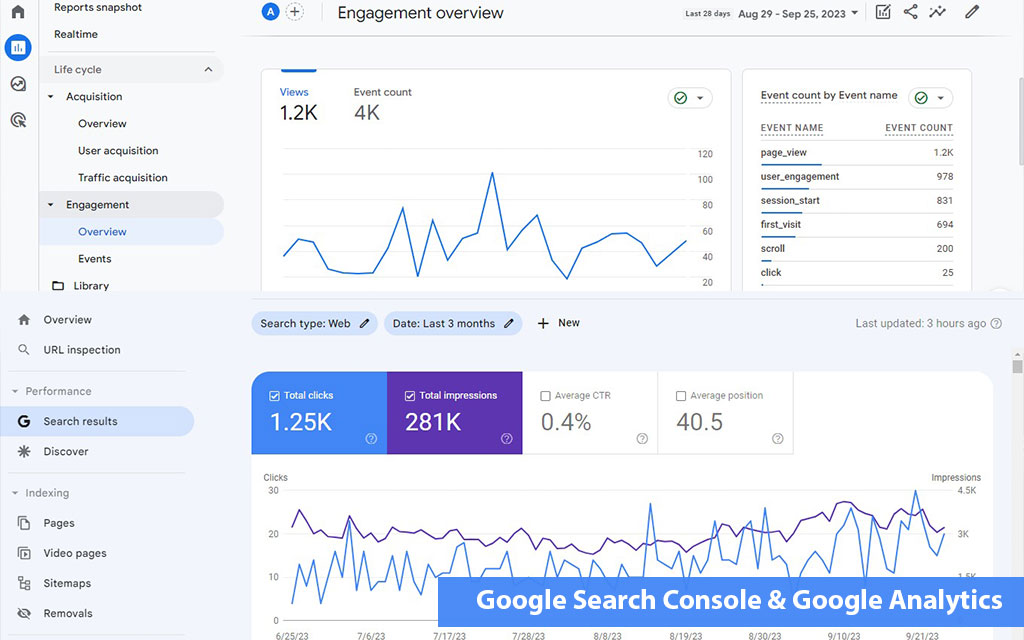
Impressions refer to impressions of a search query. If an article that has been taken measures using the query “SEO countermeasures cost” is viewed 10,000 times in search results, the number of impressions will be 10,000. In other words, it can also be interpreted as “impressions = number of views.”

click rate
Click-through rate (CTR) is a measure of the percentage of clicks compared to impressions. If you have 10,000 impressions and 100 clicks, your click-through rate is 1%.
The higher the click-through rate for impressions, the more users will flow in, so it is important to review the title tag and improve the content of the description tag.

Possibility of indexing
You can also check whether your index is available in Search Console. It is equipped with a feature called URL inspection, which allows you to increase the priority of crawling by submitting URLs of recently published articles.
In addition, if it is not indexed even after a long period of time after publication, it is important to investigate the reason why it is not indexed through URL inspection. In many cases, it may be low-quality content that doesn’t deserve to be indexed, or a noindex may prevent it from being indexed in the first place, so it’s important to improve this so that your articles are properly indexed.
Google Analytics
Earlier, I explained about Google Search Console. From here, we will explain the main functions of Google Analytics.
- Number of accesses (number of PV/number of sessions)
- bounce rate
- Attrition rate
- Staying time
- Number of CVs
- action flow
Let’s look at each in turn.
Number of accesses (PV/sessions)
You can check the number of accesses in Google Analytics. In addition to the number of accesses in real time, you can also check the number of PVs and sessions for a specified period. PV count refers to the number of times all pages are viewed, regardless of the number of users.
If 300 users view 3 articles each, the number of PVs will be 900. A session, on the other hand, is a sequence of events that begins with a specific action and ends. Therefore, if one user starts browsing and leaves after reading a total of 5 articles, the number of sessions is 1.
However, if no further action occurs within 30 minutes of starting a specific action, or if the date changes, the number of sessions will be reset.
bounce rate
Bounce rate refers to the percentage of users who start browsing and leave without moving to another article. You can check the bounce rate for each specific article as well as for the entire website. For example, if 0 users bounce from article A, the bounce rate is 0%.
On the other hand, if 3 users view article B and one of them bounces without navigating anywhere, the bounce rate will be 33%.
Attrition rate
Exit rate is the percentage of users who leave a particular page. Although many people are confused by the similarity to bounce rate, it is important to note that these are distinct metrics. For example, if 3 users view your page and all 3 users leave, the abandonment rate is 100%.
Websites and articles with poor exit rates will have a negative SEO rating, so be sure to take measures such as connecting internal links to other articles to increase the circulation rate.
Staying time
Dwell time is the amount of time someone spends on a website or on a particular piece of content. The length of stay is also calculated using an average value, so let’s say three users stayed for 1 minute, 2 minutes, and 3 minutes each. In this case, the dwell time is 2 minutes.
Tips to increase the length of stay are to place infographics within specific content and connect internal links to transition to other articles. Google evaluates content that spends a long time, so it’s important to keep users on your website for as long as possible.
Number of CVs
If you have set
points in Google Analytics, you can also check the number of CVs. Please note that Google Analytics allows you to check not only websites but also LP (landing pages), so be sure to set it up when operating LP.
action flow
A behavior flow is a chart that allows you to see which pages users are transitioning from a specific page. On a website, internal links are probably installed to increase the circulation rate, but it is necessary to check the behavior flow to see if the internal links are functioning properly.
If there are only a few users transitioning, try changing the internal link destination or the wording around the link.
We recommend linking Google search console and Google Analytics.
So far, we have explained about Google search console and Google Analytics. These can work together. Here, we will explain the benefits of linking the two and the steps to link them.

Specific benefits of collaboration between the two
The benefits of linking Google search console and Google Analytics are as follows.
- You can check the sequence of user actions at a glance
- You can check it only with Google Analytics
Since you can implement Google Search Console into Google Analytics, the biggest advantage is that after linking, you can analyze all data using only Google Analytics.

Cooperation procedure
We will introduce the steps for linking Google search console and Google Analytics.
- Log in to Analytics and click on your search query
- Click on Search Console adjustments
- addition
- Click on the site URL to link
- Cooperation completed
Since this can be implemented immediately, we recommend collaboration between the two parties as soon as possible.

summary
In this article, we explained the functions of Google search console and Google Analytics. Google Search Console is an SEO tool that analyzes what users do before they visit your website, and Google Analytics is an SEO tool that allows you to analyze what they do after they visit your website.
First of all, why not start by linking each of them in order to increase the efficiency of analysis?