

Directories
are essential when using computers and websites. However, there may be few people who accurately understand what it is, how it works, and its commonly used meaning.
In this article, we will explain the structure and types of “directories” and their commonly used meanings. If you are unsure about what directories are, please refer to this article to deepen your understanding of directories.
What is a directory?
A directory is a folder on your computer that stores files.
Directories allow you to organize and store multiple files in one location and can have a hierarchical structure.
In a computer’s file system, directories play an important role in managing the storage locations of files.
Additionally, a website requires a directory structure to properly manage web pages and other content.
Directory type
There are two main types of directories:
1. Computer directory
2. Website Directory
I will explain each in turn.

1. Computer directory
A computer directory is a folder for managing files stored on a local disk within a computer or on an external storage device such as an HDD or SSD.
In the case of Windows machines, it is represented by a drive name such as the C drive, and each drive contains multiple directories.
For example, in the case of the Windows C drive, there is a directory called “C:\” at the top level, which contains directories such as “Program Files”, “Windows”, and “Users”.
You can create directories yourself, and you can also create other directories (subdirectories) under a directory.
On your computer, you can create new folders and save related files there. This allows users to categorize and organize files on their computers.
Directories play a very important role in managing and operating your computer.
Also, when saving files, saving them in categorized directories makes it easier to search and organize files.

2.Website directory
A website directory is a folder used to organize files on a website.
A website contains data such as the pages, images, and audio files that users can access on the Internet. Storing this data in the appropriate location makes the structure of the website easier to understand and manage. If it becomes easier.
A website directory typically resides within the server hosting your website.
A website is built after determining the directory structure, but basically it starts with a top-level directory with pages including the homepage and top page, and then creates subdirectories to store web pages, images, videos, etc. Most of the time I organize my files.
For example, if you want to display the URL “https://〇〇〇〇.com/about on a website, create a subdirectory called “/about” in the top-level directory that includes the site’s top page, By saving a file called “index.html” in it, you will be able to display the page “https://〇〇〇〇.com/about.
Note that ”
subdomain
” is a concept that is often confused with subdirectory. The difference between subdirectories and subdomains is explained in detail on the following page, so please refer to it.

Difference between directory and file
Simply put, the difference between a directory and a file is that a directory is like a “box” that stores files, and a file is like “things” inside a box.
To explain in more detail, a directory is a folder for storing files, and can contain multiple files or other directories. It is a hierarchical tree, and one directory can have multiple subdirectories.
A file, on the other hand, is a single unit for storing information such as data or programs. Files have attribute information such as name, format, size, creation date and time.
When you store files inside a directory, you can access them using a specific path (directory structure).
A directory is a mechanism for organizing files, used to identify where files are stored, and files are used to access stored data and information.
Explanation of terms in which directories are used (included)
There are the following types of directories used on computers and websites.
The above refers to different things depending on whether you are using a computer or a website.
We will explain the details of each directory in turn.
root directory
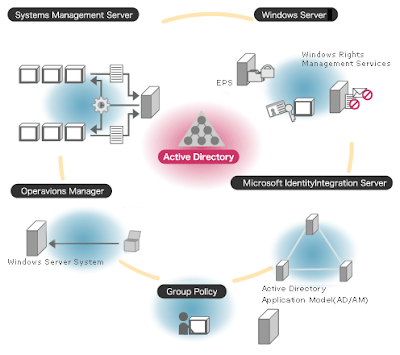
The root directory is the directory located at the “top level” and is the parent of all files and directories.
In the case of a computer, the root directory is “C:\” or “D:\” in Windows, and “/” is the root directory in OSes such as Unix or Linux.
In the case of a website’s root directory, it is the directory located at the top of all files and directories, where index.html, index.php, etc. are placed.
current directory
The current directory is the directory in which you are currently working. When you perform an operation such as file manipulation or program execution, the operation is performed on the current directory.
On a computer, the current directory is the directory where the currently open program or file exists, and the current directory is automatically set when you open a program or file.
For websites, the current directory is the directory where the currently viewed page resides, and is usually expressed as a relative path starting with “/”.

home directory
A home directory is the first directory a user goes to when they log in. A directory assigned to each user that stores the user’s files and configuration files.
Typically, the home directory path is something like “C:\Users<username>” which includes the username. However, the location of your home directory may change depending on your OS and system settings.
When a user logs in, they are directed to their home directory by default.
subdirectory
A subdirectory is a directory contained within another directory.
On a computer, the subdirectory is “Documents” in the directory “C:\Users<username>\Documents\”.
In the case of a website, if there are directories “/products/clothes/” and “/products/shoes/” under the directory “/products/”, “/products/” functions as the root directory, and “/ “products/clothes/” and “/products/shoes/” are subdirectories under that.

What is the optimal directory structure for a website?
When creating a website, it is important to be aware of the directory structure. Please keep the following two points in mind when creating the optimal directory structure for your website.
1. Basically keep it within 3 levels
2. If you have a large number of pages, create and organize a directory map.
I will explain each in turn.
1.Basically keep it within 3 levels
If the directory hierarchy becomes too deep, it will become difficult to manage and maintain the site, so it is generally a good idea to keep it within three levels.
Additionally, if a website directory has a deep and complex structure, it will be disadvantageous for
SEO
(
search engine
optimization). This is because search engine
bots
(crawlers) have difficulty crawling when the hierarchy is too deep, making it difficult for web pages and various files to be
indexed
(stored) in the search engine database.
Please keep in mind not only management and maintenance aspects, but also SEO, and try to create a directory structure that is easy to understand.
2. If you have a large number of pages, create a directory map and organize it.
As your website grows larger, it becomes difficult to keep track of the entire directory.
If your website has a large number of pages, we recommend creating a directory map to make the overall structure easier to understand.

Advantages of running a website with an optimal directory structure
In the case of a website, if it can be operated with an optimal directory structure, it will have the following advantages.
I will explain each in turn.
SEO becomes more effective
As mentioned in the previous item, if you run your website with an optimal directory structure, it will be easier for search engines to understand your website, and your SEO will be more effective. Because an optimal directory structure helps search engines understand the value and relevance of your web pages.
Search engines analyze the link structure within a website to analyze the content of the website. It works by estimating the relevance of pages within a website through the directory structure and displaying appropriate information to users searching.
An optimal directory structure helps search engines understand the relevance of your website’s pages and provides users with the right information, making it easier for search engines to understand your website.
A proper structure of your website’s directory will also have a positive impact on your SEO.
Users can easily navigate to the desired page
By creating an optimal directory structure for your website, not only search engines but also users will find it easier to navigate to the desired page, so you can expect improved usability.
Because a well-structured directory allows users to quickly and easily find the information they need.
For example, subdirectories organized by category or tag can help users quickly access content related to topics of interest.
As a result, users will have fewer clicks to get to the page they want, making the page easier to access, and likely increasing user satisfaction.
summary
In this article, we explained the structure and types of “directories” and their commonly used meanings.
Directories are a mechanism for organizing files and folders, and are widely used on computers and websites.
A computer directory is a hierarchical structure for organizing files, and a website directory is a hierarchical structure of pages reflected in URLs.
In addition, in the case of a website, building an optimal directory structure will make it easier for search engines to understand, which will improve SEO, and allow users to smoothly transition to the desired page, improving usability. You can also expect an improvement in
In particular, if you are running a website, we recommend that you refer to the contents of this article and organize your directory.